As an Amazon Associate, I earn from qualifying purchases at no extra cost to you.
6 Best Keypad Door Locks (Buying Guide) 2026
 ByZayyan

Fumbling for your keys at the front door gets old fast. Maybe you’ve locked yourself out before. Maybe you’re just tired of carrying keys everywhere. In this article I will show you the top 6 best keypad door lock options worth your money right now, so you can stop worrying and just walk in.




Top 6 Best Keypad Door Locks You Can Buy Now
Philips WiFi Fingerprint Smart Deadbolt Lock – Best for Smart Home Lovers
This lock means business. The Philips WiFi Fingerprint Smart Deadbolt connects directly to your home WiFi, so you can control it from your phone no matter where you are. Traveling? Lock the door from your couch. Forgot to lock up? One tap and you’re good.
The fingerprint reader is fast. Really fast. It reads your finger in about half a second, which honestly feels like magic the first time you try it. You can store multiple fingerprints too, so your whole family gets in without any drama.
The auto-lock feature is a big deal. You can set it to lock itself after a certain time. So even if you forget, the door locks on its own. That alone gives you serious peace of mind.
Build quality feels solid. The finish looks clean and modern. It fits most standard door setups, and installation isn’t as scary as it sounds. Most people get it done in under 30 minutes with a screwdriver.
- WiFi connected, control from anywhere
- Fast fingerprint reader, stores multiple prints
- Auto-lock timer built in
- Clean, modern look
- Easy to install
Schlage BE489WB Encode Smart Wi-Fi Deadbolt – Best for Rock-Solid Reliability
Schlage has been making locks for over 100 years. That history matters. The BE489WB Encode is one of their best, and you can tell the moment you hold it. Heavy. Solid. Built to last.
This lock works with Alexa and Google Home right out of the box. So if you’re already in that smart home world, it fits right in. Just say “lock the front door” and it’s done. No app needed in that moment.
You get up to 100 access codes. That’s huge. You can give one to your dog walker, one to your neighbor, one to your parents. And you can delete any of them anytime from the app. Total control.
The keypad itself has a nice tactile feel. The buttons give you a satisfying click when you press them. Small thing, but it matters when you’re punching in a code with cold hands or in the dark. Schlage also rates this for all weather conditions, so rain and heat won’t mess it up.
- 100+ access codes supported
- Works with Alexa and Google Home
- Excellent build quality, weather resistant
- Satisfying, easy-to-use keypad
- Strong brand reputation
TEEHO TE001 Keyless Entry Door Lock – Best Budget Pick That Still Delivers
Don’t let the price fool you. The TEEHO TE001 punches well above its weight. It’s a solid keyless entry lock that gives you fingerprint access, keypad entry, and a physical key backup. Three ways to get in. That’s smart.
Setup is simple. The instructions are clear, and the app is easy to use. You don’t need to be a tech person to get this running. Most people have it fully working within 20 minutes, which is rare for smart locks.
The fingerprint sensor works reliably. It’s not as instant as premium models, but it’s close. You’ll notice maybe a one-second delay, which is totally fine in real life. The passcode side is equally dependable. Just type your code and the door opens.
Weatherproofing is solid for the price. This lock holds up in rain and heat without complaint. If you want a budget-friendly option that actually works day after day, this is the one to grab. Great for apartments, rental units, or a secondary door.
- Three entry methods: fingerprint, keypad, key
- Fast and easy setup
- Reliable fingerprint sensor
- Good weatherproofing
- Great value for money
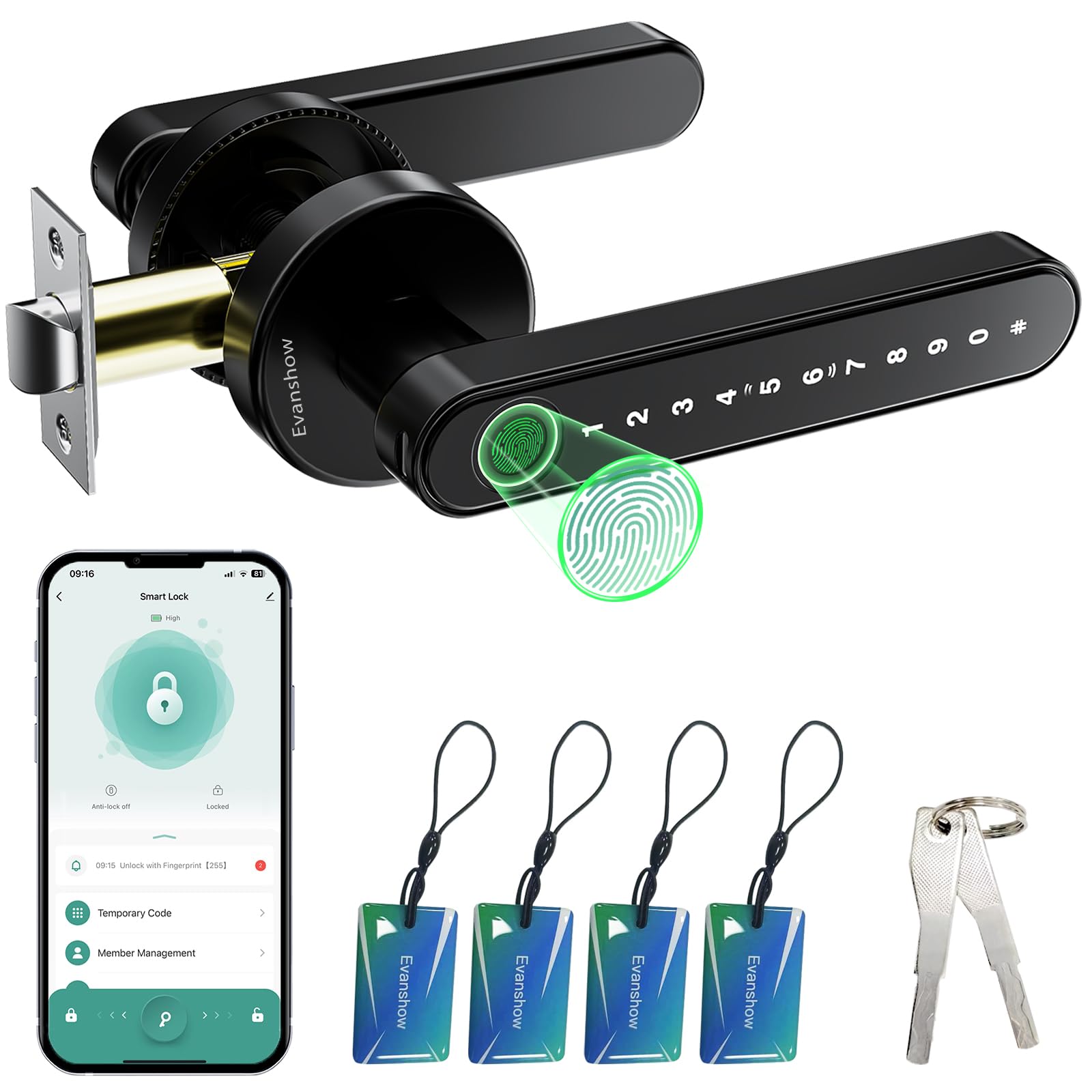
Evanshow Fingerprint Smart Door Lock – Best for Apartment Renters
Apartments have specific needs. You usually can’t drill big holes or make major changes. The Evanshow is built with that in mind. It’s compact, easy to fit on most apartment doors, and doesn’t require you to gut your doorframe to install it.
The fingerprint system here is genuinely good. It stores up to 100 fingerprints, which means your whole household, plus guests, can get in without needing a code. That’s super useful for families or shared apartments.
One standout feature is the one-time passcode. You can generate a temporary code for a guest or delivery person that expires after one use. That’s a really thoughtful security feature that not every lock at this price has.
The lock also gives you a low battery alert, so you’re never caught off guard. Battery life is solid, lasting several months on a fresh set. Overall, it’s a thoughtful design that solves real problems renters actually face every day.
- Apartment-friendly design and fit
- Stores up to 100 fingerprints
- One-time passcode generation
- Low battery alert included
- Long battery life
Keypad Door Lock with Handle – Best All-in-One Replacement
Most deadbolts are just the lock part. You still need a separate handle. This one comes with both. That’s the whole point and it’s a genuinely useful thing if you’re replacing an old handle-and-lock combo at the same time.
The handle feels sturdy. It’s not flimsy or loose like some cheaper combo sets. The finish looks nice and it matches well with most door hardware. If you care about how your entryway looks, this won’t disappoint.
The keypad is backlit, which means you can see the numbers clearly at night. Such a simple thing, but you’d be amazed how many locks skip this. Coming home late and typing in your code without squinting makes a real difference.
It runs on batteries and gives you a low-battery warning before things go wrong. Setup takes about 30 minutes and doesn’t need professional help. If you want a clean, complete door lock solution in one box, this is a smart pick.
- Handle and lock included in one package
- Backlit keypad for night use
- Solid, good-looking build
- Low battery warning system
- Easy DIY installation
NICE DIGI Keypad Door Lock with Handle – Best for Multiple Entry Methods
Some people love fingerprints. Some want a keypad. Some still want a physical key. The NICE DIGI gives you all of that. It supports fingerprint, passcode, key card, app control, and a traditional key. Five ways to open one door.
That flexibility is the biggest selling point. You set up the system once, then different family members use whatever method works for them. Grandma can use the key. The kids use the keypad. You use your fingerprint. Everyone wins.
App control works well. The interface is clean and the connection is stable. You can manage access codes, check who came and went, and lock or unlock remotely. It keeps a history log, which is useful if you want to know when your teenager actually got home.
Build quality is good for the price. It feels solid and handles daily use without wearing down. The keypad has a nice response to it and the fingerprint reader is fast. If you want the most flexible lock on this list, this one’s hard to beat.
- Five entry methods in one lock
- Clean, easy-to-use app
- Access history log
- Solid everyday build quality
- Great for multi-person households
I hope this guide made your decision a whole lot easier. Every lock on this list is worth your money for different reasons. If security is your top priority, go Schlage. If you’re on a budget, grab the TEEHO. If you want the most flexibility, the NICE DIGI is your best bet. Pick the one that fits your life, install it this weekend, and stop worrying about your keys forever.
| Product | Entry Methods | Smart Home | Best For | Price Range |
|---|---|---|---|---|
| Philips WiFi Fingerprint Smart Deadbolt | Fingerprint, Keypad, WiFi App | Yes | Smart home users | $$$ |
| Schlage BE489WB Encode | Keypad, WiFi App | Yes (Alexa, Google) | Reliability seekers | $$$$ |
| TEEHO TE001 | Fingerprint, Keypad, Key | No | Budget buyers | $ |
| Evanshow Fingerprint Smart Lock | Fingerprint, Keypad, App | Limited | Apartment renters | $$ |
| Keypad Door Lock with Handle | Keypad, Key | No | Simple replacement | $$ |
| NICE DIGI Keypad Door Lock | Fingerprint, Keypad, Key Card, App, Key | Yes | Multi-user households | $$ |
Things to Consider Before Buying a Keypad Door Lock (Complete Guide)
Buying a keypad door lock sounds simple. You pick one, you install it, done. But there are a few things that can trip you up if you skip the research, and that’s how you end up with a lock that doesn’t fit your door, drains batteries in two weeks, or gets bypassed by a strong kick.
Knowing the things to consider before buying a keypad door lock saves you money, frustration, and honestly, a lot of regret. So here’s everything you need to think through before you click that buy button.
Compatibility With Your Door
Not every lock fits every door. This is the number one thing people overlook, and it causes real headaches. Before you buy anything, measure your door’s thickness and check the existing hole sizes. Most standard doors in the US are between 1-3/8 and 1-3/4 inches thick. If your door is outside that range, you’ll need a lock that says so on the box.
Also check the backset. That’s the distance from the edge of your door to the center of the lock hole. Most locks work with a 2-3/8 or 2-3/4 inch backset. Sounds small, but getting this wrong means the lock doesn’t latch properly. That’s a security nightmare.
Some apartment doors have non-standard setups. If you’re renting, check with your landlord and measure twice before you order.
- Measure door thickness before buying
- Check your backset distance (2-3/8 or 2-3/4 inch are most common)
- Confirm deadbolt vs. handle lock based on your existing setup
- Non-standard doors may need special models
Power Source and Battery Life
Keypad locks run on batteries. That sounds obvious, but a lot of buyers don’t think about what happens when those batteries die. Most good locks warn you with a beep or a flashing light a few weeks before they die. But some cheaper models just stop working with zero warning.
AA batteries are the most common, and they’re easy to find anywhere. Some newer models use rechargeable lithium batteries. Those last longer, but if you forget to charge it, you’re locked out. Think about which scenario stresses you less.
Also think about how often your door gets used. A high-traffic front door drains batteries faster than a side entrance you use twice a week. Look for locks that advertise at least 6 to 12 months of battery life under normal use.
- Look for low-battery alerts before you buy
- AA battery locks are easiest to maintain
- Estimate your door’s daily usage when comparing battery life claims
- Always keep a spare set of batteries nearby
Security Rating and Build Quality
A keypad does you no good if the lock itself is flimsy. Look for locks that carry an ANSI/BHMA grade rating. Grade 1 is the strongest, built for heavy commercial use. Grade 2 is solid for most homes. Grade 3 is the weakest, fine for interior doors but not your front entrance.
The material matters too. Solid brass and reinforced steel hold up much better than zinc alloy under physical force. A cheap lock might survive years of normal use but fail the moment someone kicks it hard or tries to yank it. That’s a risk you don’t want to take with your front door.
Also check for anti-tamper features. Some locks trigger an alarm if someone enters the wrong code too many times. That kind of built-in protection is worth paying a little extra for.
- Look for ANSI/BHMA Grade 1 or Grade 2 ratings
- Solid brass or steel construction is stronger than zinc alloy
- Anti-tamper alarms add a real layer of security
- Avoid locks with no brand reputation or certifications
Smart Features vs. Basic Keypad
Some keypad locks are just keypads. You type a code, door opens. Others connect to WiFi, work with Alexa, send you alerts, and let you unlock the door from across the country. Both are valid choices. It just depends on what you actually need.
If you want simplicity and you don’t care about remote access, a basic keypad lock is perfect. Fewer parts means fewer things that can break or get hacked. But if you travel a lot or rent out your space on Airbnb, remote access is genuinely useful. You can hand out one-time codes without being there in person.
Just don’t pay for smart features you’ll never use. A lot of people buy WiFi-connected locks, never set up the app, and just type in the code every day. That’s fine, but you probably spent more than you needed to.
- Basic keypad: simpler, fewer failure points, no app needed
- Smart locks: remote access, temporary codes, activity logs
- WiFi locks need a stable home network to work properly
- Match the features to how you actually live
Weather Resistance and Outdoor Rating
If your lock is going on an exterior door, weather resistance is non-negotiable. Rain, heat, cold, and humidity all slowly destroy electronics and metal. A lock that looks great in your living room might rust or malfunction after one rainy season outside.
Look for an IP rating on the product specs. IP65 means it’s protected against dust and water jets. IP44 means it handles light rain. Anything with no IP rating at all? Skip it for outdoor use. You’ll thank yourself later when you’re not replacing the whole thing after winter.
Also think about temperature extremes. If you live somewhere with harsh winters, check that the lock is rated for low temperatures. Some fingerprint sensors stop reading accurately when it gets very cold. That’s annoying at best and a real problem if you’re standing in the snow at midnight.
- Always check the IP weather rating before buying
- IP65 or higher is best for most outdoor doors
- Cold weather can affect fingerprint sensors
- Look for UV resistance if your door gets direct sunlight
Ease of Installation and Setup
Most keypad locks are marketed as DIY-friendly. And honestly, most of them are. But “easy” means different things depending on your comfort level with basic tools. If you’ve never touched a screwdriver, even a simple install might feel overwhelming.
The good news is that most deadbolt replacements are genuinely simple. You remove the old lock, line up the new one, tighten a few screws, and you’re done. The part that takes the most time is usually programming the codes and connecting to an app. That varies a lot by brand.
Read real customer reviews specifically about installation. Not the star rating, the actual comments. People who struggled or found it easy will tell you exactly what happened. That’s more useful than anything the product description says.
- Standard deadbolt replacement takes 20 to 30 minutes
- App setup can take longer than physical install
- Read installation reviews, not just overall star ratings
- Check if the lock comes with all necessary hardware
I hope this breakdown helps you feel confident going into your purchase. Knowing the things to consider before buying a keypad door lock means you won’t waste money on something that doesn’t fit, drains out fast, or leaves you standing at your door in frustration. Take your time, match the lock to your actual life, and you’ll make a great choice.
| Factor | What to Check | Why It Matters | Pro Tip |
|---|---|---|---|
| Door Compatibility | Door thickness, backset distance, hole size | Wrong fit means the lock won’t latch or install properly | Measure twice before ordering |
| Battery Life | Expected lifespan, battery type, low-battery alert | Dead battery with no warning can lock you out completely | Keep a spare set of batteries inside |
| Security Rating | ANSI/BHMA grade, lock material, anti-tamper features | A weak lock fails under physical force no matter how smart it is | Look for Grade 1 or Grade 2 minimum |
| Smart Features | WiFi, app control, temporary codes, activity log | Overpaying for features you never use wastes money | List what you actually need before shopping |
| Weather Resistance | IP rating, temperature range, UV protection | Outdoor locks face sun, rain, and cold every single day | IP65 or higher for any exterior door |
| Installation Difficulty | Included hardware, app setup process, customer support | A confusing install turns a 30-minute job into a 3-hour headache | Read installation-specific reviews on Amazon |
Frequently Asked Questions (FAQs)
Is it safe to use a keypad door lock instead of a traditional key lock?
Yes, absolutely. Keypad locks are actually harder to pick than traditional key locks because there’s no physical keyhole to tamper with. As long as you choose a strong, unique access code and change it regularly, you’re well protected. Many of these locks also have anti-tampering alarms built in, which adds another layer of security.
Is it easy to install a keypad door lock yourself?
Most of the locks on this list are designed for DIY installation. You typically just need a screwdriver and about 20 to 30 minutes. The tricky part is making sure the lock fits your door’s existing holes. Check the door prep measurements before you buy, and you should be fine. No electrician or locksmith required.
Can someone hack into my smart keypad lock?
It’s possible in theory, but unlikely in practice if you buy from a reputable brand. Brands like Schlage and Philips use encryption to protect their WiFi connections. The bigger real-world risk is someone watching you type in your code. So change your code regularly and don’t use obvious numbers like your birthday or “1234.”
Do keypad door locks work during a power outage?
Yes. All the locks on this list run on batteries, not your home’s electricity. So a power outage won’t affect them at all. Just keep an eye on the battery level and replace them when the low-battery warning goes off. Most locks give you plenty of warning before the batteries fully die.
Can I give temporary access to guests without sharing my main code?
Yes, and this is one of the best features of smart locks. Many of these models let you create temporary access codes that expire after a set time or after one use. The Evanshow, for example, has a one-time passcode feature specifically built for this. It’s perfect for letting in a repairman or a guest without giving them permanent access.
Do I need a smartphone to use these locks?
Not necessarily. Most locks on this list work fine without a phone. You can enter your code on the keypad or use the fingerprint reader. The smartphone app just adds extra features like remote access, access logs, and code management. So if you’re not a big phone person, you can still use these locks just fine.
Can keypad locks work in extreme weather like heavy rain or extreme heat?
Most of the locks here are rated for outdoor weather. The Schlage BE489WB, for example, is built for all weather conditions. The TEEHO TE001 also has solid weatherproofing. That said, if you live somewhere with really extreme conditions like coastal salt air or very harsh winters, double-check the IP weather rating before buying. It matters more than people think.
Is it possible to use a keypad lock on an apartment door?
Yes, but you need to check a few things first. Make sure the lock fits your existing door prep holes so you don’t need to drill new ones. Also check with your landlord if modifications are allowed. The Evanshow on this list is specifically designed with apartment-friendly sizing in mind, making it one of the easier options for renters to use.
Do keypad locks need WiFi to work?
Not all of them. Locks like the TEEHO TE001 work completely offline. The WiFi or app-based locks like the Schlage Encode and Philips Smart Deadbolt need a WiFi connection for their remote features, but the keypad and fingerprint functions still work locally even if your internet goes down. So you’re never locked out because of a bad connection.
Can multiple people use the same keypad lock with their own codes?
Yes, and this is one of the most useful things about modern keypad locks. Most models let you store multiple unique codes, sometimes up to 100 or more. Each person gets their own code. You can delete individual codes anytime without changing everyone else’s. It’s great for families, roommates, or rental properties where people come and go.