As an Amazon Associate, I earn from qualifying purchases at no extra cost to you.
6 Best Ring Doorbell Cameras (Buying Guide) 2026
 ByZayyan

Picking a video doorbell is harder than it sounds. There are dozens of options, and most of them look the same on paper. In this article I will show you the top 6 best ring doorbell cameras worth your money right now, what makes each one special, and which one fits your home best.



Top 6 Best Ring Doorbell Cameras You Can Buy Now
Aqara G4 Video Doorbell – Best for Smart Home Fans
If you’re already deep into the smart home world, the Aqara G4 is going to feel like it was made just for you. It works with Apple HomeKit, Google Home, and Amazon Alexa. That’s rare. Most doorbells pick a side. This one plays nice with everyone.
The face recognition feature is what really stands out. It can actually tell the difference between a family member and a stranger. So instead of getting a generic “someone’s at the door” alert, you get “Mom is at the door.” That’s genuinely useful, not just a gimmick.
Video quality is solid. You get a 1080p feed with a good wide-angle view. The night vision works well too. You won’t be squinting at a blurry blob at 2 AM. The image stays sharp even in low light.
One thing worth knowing: the Aqara G4 comes with a chime included, which a lot of competitors charge extra for. Setup is smooth if you’re comfortable with smart home apps. Beginners might need a few minutes to figure it out, but it’s not bad.
- Works with Apple HomeKit, Google Home, and Alexa
- Face recognition that identifies known visitors
- 1080p video with solid night vision
- Chime included in the box
- Great for existing smart home setups
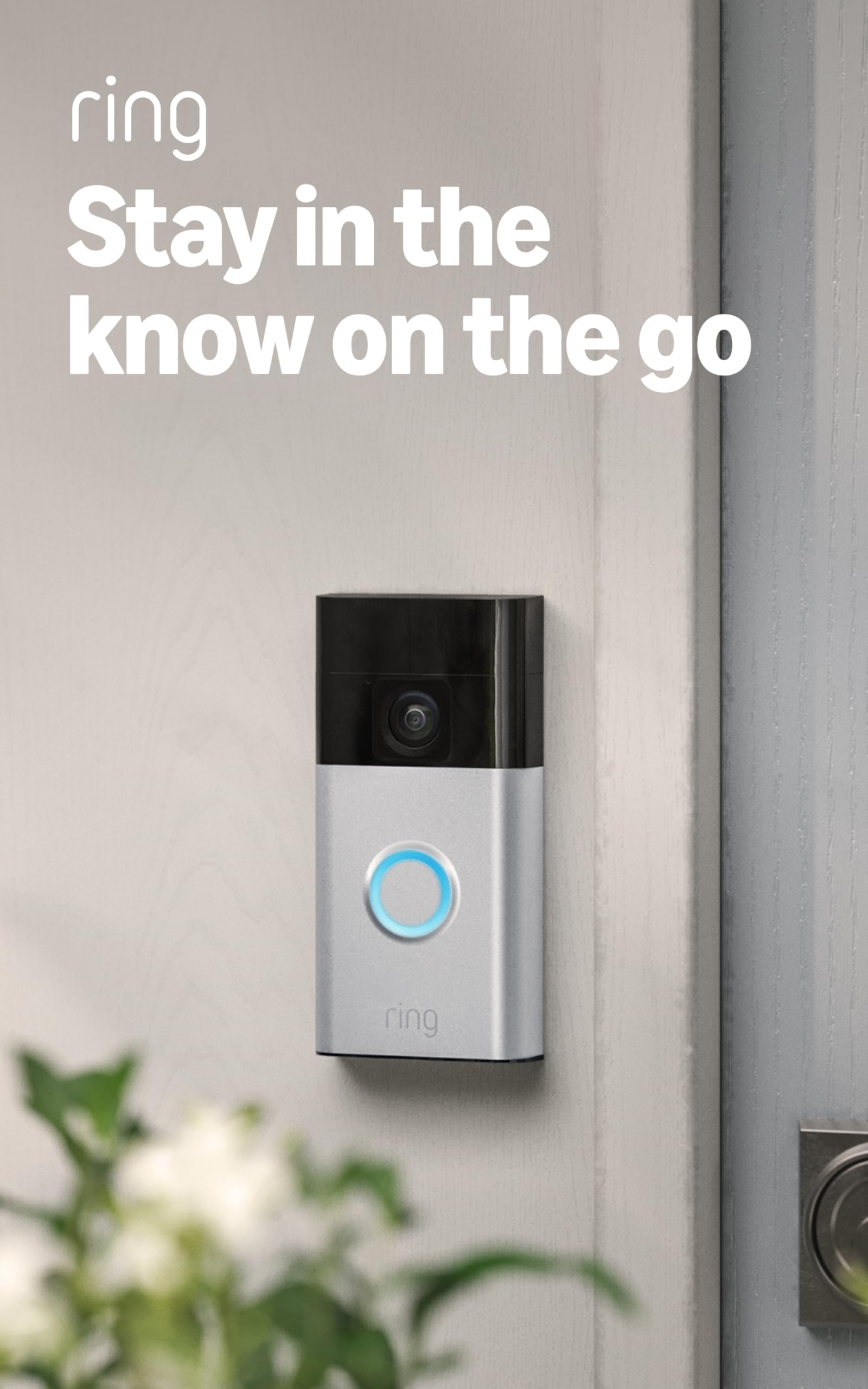
Ring Battery Doorbell – Best All-Around Pick
The Ring Battery Doorbell is the one most people end up buying. And honestly, there’s a reason for that. It’s not the flashiest option, but it just works. Every time. Without drama.
The head-to-toe video is one of its best features. It captures a tall, vertical view so you can see packages left on your porch, not just someone’s face. That matters more than you’d think, especially if porch pirates are a problem in your neighborhood.
Battery-powered means no wiring headaches. You charge it, mount it, and you’re done. Most people charge it every few months depending on how much activity they get. If you’re in a busy area, expect to charge more often.
The Ring app is easy to use. Motion alerts come through fast. You can talk to whoever’s at the door through the two-way audio, which works great. If you already use Ring cameras inside your home, this slots right in with no extra setup.
- Head-to-toe vertical video
- Wire-free, battery-powered setup
- Fast motion alerts through the Ring app
- Two-way audio that actually works
- Fits seamlessly into existing Ring ecosystems
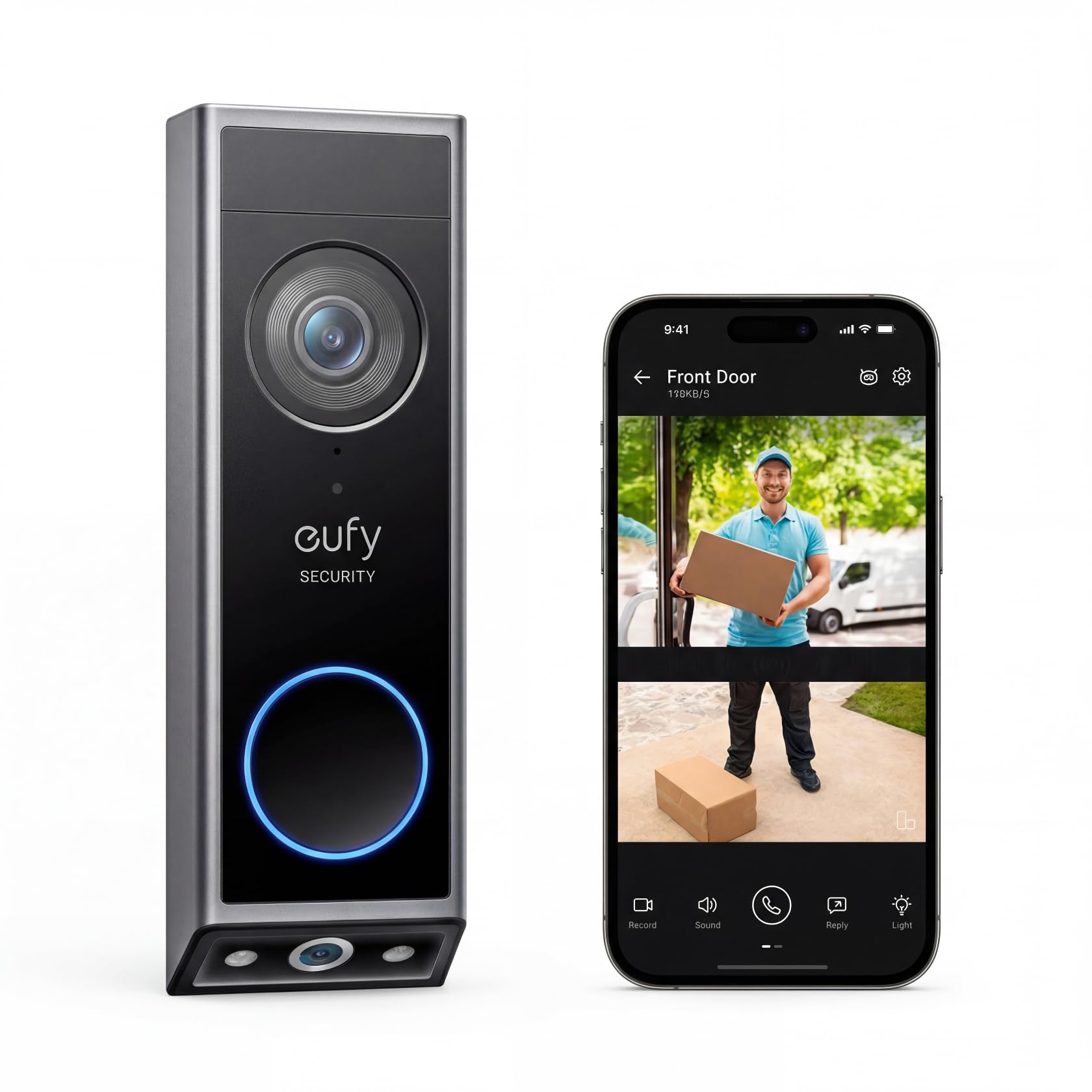
eufy E340 Security Video Doorbell – Best for Delivery Detection
The eufy E340 is built for people who shop online a lot. Which, honestly, is most of us. It has a dedicated delivery detection feature that sends you a specific alert when a package gets dropped off. Not just a motion alert. A package alert. Big difference.
It also has dual cameras. One faces forward to see faces, and one looks down to see what’s on the porch. So you get both angles covered without any blind spots. That’s a smart design choice that most doorbells skip entirely.
Video quality is excellent. The E340 shoots in 2K, so the footage is crisp and clear. You can zoom in and still see details. License plates, faces, labels on packages, it all holds up well when you zoom in.
No monthly subscription is required for local storage. That’s a huge deal. A lot of doorbell cameras lock your footage behind a paywall. eufy gives you local storage out of the box. That saves you real money over time.
- Dedicated delivery detection alerts
- Dual cameras for face and package coverage
- 2K resolution with clear zoom
- Local storage with no subscription needed
- Great value for package-conscious households
Tapo 2K+ Smart Video Doorbell – Best Budget Pick with Big Features
The Tapo D225 punches way above its price. For what it costs, you get 2K+ resolution, a super wide field of view, and smart detection that can tell a person apart from a car or an animal. That level of smarts usually comes on cameras that cost twice as much.
The ultra-wide angle is legitimately impressive. It captures more of your porch, driveway, and yard than most other doorbells. If you’ve got a wide entryway or a long porch, this is the one you want. You won’t be cropping out half your view.
Person, vehicle, and pet detection all work separately. So you can set it up to only notify you when a person walks up, not every time a squirrel runs by. That keeps your phone from buzzing all day for no reason.
It also integrates with the Tapo app, which is clean and easy to use. If you already have Tapo cameras or smart plugs at home, this fits right in. Even if you’re starting fresh, the setup is simple and quick.
- 2K+ video at an affordable price
- Ultra-wide field of view
- Separate detection for people, vehicles, and pets
- Clean Tapo app with easy setup
- Best bang for your buck on this list
WYZE V2 Security Camera Video Doorbell – Best for Tight Budgets
The WYZE V2 is the most affordable doorbell on this list. And it doesn’t feel cheap. That’s the thing about WYZE. They’ve always been good at making budget gear that holds its own against pricier competition.
You get 1080p video, two-way audio, and motion detection. The basics are all covered. For someone who just wants to know who’s at the door without spending a lot, this does exactly that. No fuss, no drama.
The WYZE app is one of the better budget app experiences out there. It’s responsive, the alerts come through quickly, and it doesn’t feel clunky. A lot of cheap cameras have terrible apps. WYZE isn’t one of them.
One thing to be honest about: it doesn’t have some of the premium features like face recognition or delivery alerts. But if you don’t need those things, why pay for them? The WYZE V2 gives you what you actually need at a price that won’t hurt your wallet.
- 1080p video with clear image quality
- Responsive, reliable WYZE app
- Two-way audio included
- Motion detection that works well
- Most budget-friendly option on the list
Logitech Circle View Doorbell – Best for Apple HomeKit Users
If you’re an iPhone person with a house full of Apple devices, the Logitech Circle View Doorbell was made for you. It’s one of the very few doorbells that’s fully built around Apple HomeKit. Not just compatible. Actually built for it from the ground up.
That means you get full HomeKit Secure Video support. Your footage is end-to-end encrypted and stored in iCloud. Apple processes everything locally on the device, so your video never passes through a third-party server. For privacy-focused people, that’s a huge deal.
The TrueView technology gives you a tall, head-to-toe view similar to Ring’s. You’ll see packages, kids, pets, everything that’s at your door. The video quality is sharp, and the color accuracy is really good, even in tricky lighting conditions.
Face recognition works through Apple’s own on-device processing. It’s fast and accurate. You’ll get alerts like “familiar face at the front door” rather than just “motion detected.” It works really well once your iPhone learns your regular visitors.
- Fully built for Apple HomeKit
- End-to-end encrypted footage stored in iCloud
- TrueView head-to-toe video
- On-device face recognition via Apple
- Best choice for Apple ecosystem homes
I hope this guide made your decision a whole lot easier. Every doorbell on this list is solid. It just depends on what you need. Go with eufy E340 if packages are your biggest worry. Pick Logitech if you’re all-in on Apple. Grab WYZE if budget is tight. And if you want the best all-rounder, Ring is still hard to beat. Whatever you choose, you’re making your home safer today.
| Product | Resolution | Smart Detection | Subscription Needed | Best For |
|---|---|---|---|---|
| Aqara G4 Video Doorbell | 1080p | Face Recognition | Optional | Smart Home Users |
| Ring Battery Doorbell | 1080p+ | Person, Motion | Yes (Ring Protect) | All-Around Use |
| eufy E340 Video Doorbell | 2K | Package, Person | No | Delivery Tracking |
| Tapo D225 Video Doorbell | 2K+ | Person, Vehicle, Pet | Optional | Budget Shoppers |
| WYZE V2 Video Doorbell | 1080p | Motion, Person | Optional | Tight Budgets |
| Logitech Circle View | 1080p | Face (Apple) | iCloud+ | Apple Users |
Things to Consider Before Buying Ring Doorbell: A Complete Buyer’s Guide
Buying a video doorbell sounds simple. You pick one, you mount it, done. But then you get home and realize your Wi-Fi doesn’t reach the front door, or the wiring is wrong, or the subscription costs more than you expected. Happens all the time.
Knowing the things to consider before buying ring doorbell can save you real money and a lot of frustration. So here’s everything you actually need to think about before you hit that buy button.
Your Wi-Fi Signal at the Front Door
Most people forget this one until it’s too late. Your Ring doorbell lives outside, usually far from your router. And a weak signal means delayed alerts, choppy video, and missed notifications. That’s the opposite of what you paid for.
Test your signal strength at your front door before you buy anything. You can use a free app like WiFi Analyzer on Android. If the signal is weak, you might need a Wi-Fi extender or a mesh network node closer to the entrance. Ring also sells their own extender called the Ring Chime Pro, which doubles as a signal booster.
A good rule of thumb: you want at least a solid two-bar connection at your front door. Anything weaker and you’ll run into problems eventually.
- Test Wi-Fi signal strength at the front door before buying
- Use a free app to check signal quality
- Consider a Wi-Fi extender if signal is weak
- Ring Chime Pro can boost signal and act as an indoor chime
Wired vs. Battery Powered
This is probably the biggest decision you’ll make. Wired doorbells tap into your existing doorbell wiring. Battery ones just need charging every few months. Both have real tradeoffs.
Wired is more reliable. You never worry about the battery dying right when someone’s trying to break in. But if you don’t have existing wiring at your front door, installation gets complicated fast. You might need an electrician, which adds cost.
Battery-powered is easier to set up. You charge it, mount it, connect it to Wi-Fi, and you’re done. The downside is that in cold winters, battery life drops noticeably. If you live somewhere that gets below freezing, expect to charge more often than the box suggests.
- Wired doorbells are more reliable but need existing wiring
- Battery models are easier to install but need regular charging
- Cold weather drains battery faster
- No existing wiring? Budget for an electrician if you go wired
Video Resolution and Field of View
Not all video is the same. A 1080p doorbell and a 2K doorbell can look very different when you’re trying to read a license plate or see a face clearly. Resolution matters, but field of view matters just as much.
A wide field of view means you see more of your porch, driveway, and yard. Some doorbells also shoot vertically (tall video) instead of just wide. That vertical view lets you see packages on the ground, not just faces. If porch theft is a concern, that’s a big deal.
Think about what you actually want to see. A narrow driveway needs different coverage than a wide-open front porch. Look at the specs and, if you can, watch sample footage from that exact model on YouTube before buying.
- Higher resolution means clearer footage when you zoom in
- Look for head-to-toe vertical video for package visibility
- Wide field of view covers more ground
- Watch real sample footage online before deciding
Subscription Costs and Cloud Storage
This catches a lot of people off guard. The doorbell itself is a one-time cost. But most of the best features, like video history, advanced alerts, and cloud storage, sit behind a monthly subscription.
Ring’s subscription plan is called Ring Protect. Without it, you can still see live video and get motion alerts, but you can’t go back and review old footage. That’s a pretty big limitation. If something happens and you need proof, you’ll want that recording.
Some brands skip the subscription altogether. eufy, for example, offers free local storage built right into the device. If paying a monthly fee bothers you, that’s worth knowing before you commit to Ring. Compare the total cost over a year, not just the upfront price.
- Ring requires a subscription for video history
- Without it, you can only see live video
- eufy and some others offer free local storage
- Calculate the yearly cost, not just the device price
Smart Home Compatibility
If you already have smart home devices at home, this matters more than you’d think. Not every doorbell plays nice with every ecosystem. And finding out after the fact is annoying.
Ring works great with Alexa. Makes sense, Amazon owns Ring. But it doesn’t fully support Apple HomeKit. If you’re an iPhone user with HomePod minis and Apple TVs at home, the Logitech Circle View or Aqara G4 might suit you better. Check compatibility before you buy, not after.
Also think about routines and automations. A good smart doorbell can trigger your porch lights when motion is detected, or unlock a smart lock when a family member arrives. That only works if your devices are all compatible and talking to each other properly.
- Ring works best with Amazon Alexa
- Apple HomeKit users should look at Logitech or Aqara
- Check compatibility with your existing devices first
- Automations only work when everything is in the same ecosystem
Local Privacy Laws and Neighbor Considerations
This one most people skip entirely. But it’s worth a few minutes of thought. Depending on where you live, pointing a camera toward a public sidewalk or a neighbor’s property could create legal issues.
In most places in the US, recording public areas from your own property is totally fine. But some states and countries have stricter rules around audio recording specifically. Two-way audio is a feature on basically every doorbell now, so it’s good to know if recording conversations requires consent in your state.
Also, just be a decent neighbor. If your doorbell camera clearly captures your neighbor’s front door or driveway in full detail, it’s worth adjusting the angle or using privacy zones. Most Ring cameras let you block out certain areas of the frame. Use that feature. It avoids awkward conversations later.
- Recording public areas is usually legal but check local laws
- Audio recording laws vary by state and country
- Use privacy zones to avoid capturing neighbor’s property
- Adjust camera angle to respect nearby homes
I hope this breakdown made the decision feel a lot less overwhelming. The things to consider before buying ring doorbell go way beyond just picking the prettiest model on Amazon. Think about your Wi-Fi, your wiring, your budget for subscriptions, and who your smart home already talks to. Get those right, and whatever doorbell you pick will actually work the way you want it to.
| Factor | What to Check | Why It Matters | Quick Tip |
|---|---|---|---|
| Wi-Fi Signal | Test signal strength at front door | Weak signal causes delays and missed alerts | Use a free Wi-Fi analyzer app first |
| Power Source | Check if existing doorbell wiring exists | Decides between wired and battery models | No wiring? Go battery or budget for an electrician |
| Video Quality | Look at resolution and field of view | Affects how clearly you see faces and packages | Watch real sample footage on YouTube before buying |
| Subscription Cost | Read the full plan details before buying | Unlocks video history and advanced features | Calculate total yearly cost, not just device price |
| Smart Home Ecosystem | Check Alexa, Google, or HomeKit support | Ensures your devices work together smoothly | Ring for Alexa, Logitech or Aqara for Apple HomeKit |
| Privacy and Laws | Review local recording laws | Protects you from legal issues with neighbors | Use privacy zones to block sensitive areas from view |
Frequently Asked Questions (FAQs)
Is it easy to install a video doorbell yourself?
Yes, most video doorbells on this list are designed for DIY installation. Battery-powered ones like the Ring Battery Doorbell are the easiest since you skip the wiring entirely. Wired doorbells need a bit more work but usually come with solid instructions. If you’re handy at all, you can do it in under 30 minutes.
Is it worth paying for a doorbell camera subscription?
It depends on how you use it. Subscriptions usually unlock video history, advanced alerts, and cloud storage. If you only want live viewing and basic motion alerts, you might be fine without one. But if you ever need to go back and check footage from a few days ago, a subscription makes a real difference.
Can a video doorbell work without Wi-Fi?
Not really. All video doorbells need Wi-Fi to send alerts, stream video, and connect to your phone. Some can do limited local recording without internet, but you lose most of the smart features. A strong, stable Wi-Fi signal near your front door is basically a must for any of these to work properly.
Can I use these doorbells without a subscription?
Yes, most of them work without a subscription at a basic level. The eufy E340 is the standout here because it gives you free local storage with no ongoing cost. WYZE and Tapo also offer free tiers. Ring pretty much requires a subscription to get full value, though it does work in limited mode without one.
Do video doorbells work in extreme heat or cold?
Most of them are built to handle a decent range of temperatures. Hot summers and cold winters are generally fine. That said, battery life can drop significantly in very cold weather. If you live somewhere that gets seriously cold in winter, a wired doorbell might hold up better than a battery-powered one over time.
Is it possible to use these with multiple phones?
Yes. Most doorbell apps let you share access with family members. You can add multiple accounts or share a single account across devices. Ring, eufy, and WYZE all make this easy through their apps. That way your partner or roommate gets alerts too, not just you.
Can these doorbells detect packages specifically?
The eufy E340 is the best one on this list for that. It has a dedicated package detection mode that sends a specific alert when a box is left at your door. Other doorbells use general motion detection, which works but doesn’t tell you it’s specifically a package. If porch piracy is a concern, eufy is your best bet.
Do I need a chime with a video doorbell?
It depends on your setup. Some doorbells, like the Aqara G4, come with a chime in the box. Others let you use your existing doorbell chime if it’s wired. Many people rely on phone notifications alone and skip the chime entirely. If you want an audible ring inside your home, check whether the doorbell includes one or supports your existing chime.
Is my footage private with these doorbells?
Mostly yes, but it depends on which one you pick. The Logitech Circle View is the gold standard here because it uses Apple HomeKit Secure Video, which is end-to-end encrypted. Other brands store footage on their own servers, which is generally safe but not quite as locked down. If privacy is your top concern, go with Logitech or eufy for local storage.
Can a video doorbell replace a security camera?
It can cover your front door really well, but it won’t replace a full security setup. A doorbell camera only sees one direction. If you want coverage for the sides of your house, backyard, or driveway, you’ll still need separate cameras. Think of it as one piece of your security setup, not the whole thing.