As an Amazon Associate, I earn from qualifying purchases at no extra cost to you.
6 Best Keyless Door Locks (Buying Guide) 2026
 ByZayyan

Fumbling for your keys in the dark is the worst. Maybe you’ve locked yourself out before, or you’re just tired of carrying a key everywhere. Whatever your reason, keyless door locks are genuinely worth it. In this article I will show you the top 6 best keyless door lock options you can buy right now, with honest reviews for each.



Top 6 Best Keyless Door Locks You Can Buy Now
TEEHO TE001 Keyless Entry Door Lock – Best Budget Pick
If you want a solid keyless lock without spending a lot, the TEEHO TE001 is hard to beat. It’s one of the most affordable options on this list, and it punches way above its price. You get a keypad entry system that works fast and feels sturdy when you press the buttons.
The weatherproofing on this lock is a big deal. If you live somewhere with rain, snow, or humidity, you need a lock that can handle it. The TE001 is built for outdoor use, so you don’t have to worry about it failing on a cold winter morning. That’s something a lot of cheap locks get wrong.
Setup is surprisingly easy. Most people get it installed in under 30 minutes. You don’t need to be handy or call a locksmith. The instructions are clear, and it fits standard door prep, so it works on most front doors without extra drilling.
You can set up multiple codes too. One for you, one for the kids, one for a house cleaner. And when you don’t need someone’s access anymore, you just delete their code. Simple and clean.
Quick Summary:
- Great for tight budgets
- Weatherproof and durable outdoors
- Easy DIY installation
- Supports multiple access codes
- No app or smart home features
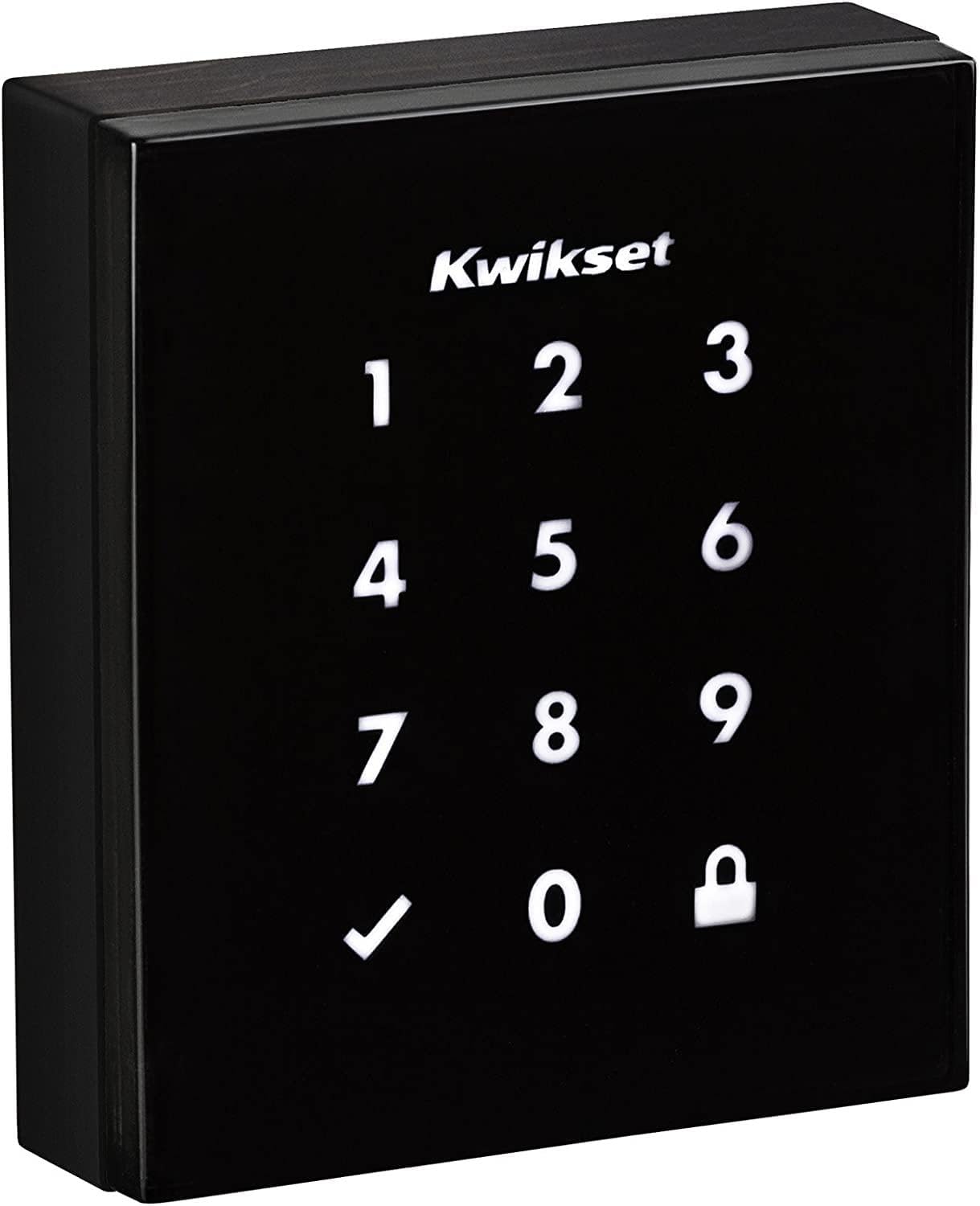
Kwikset Obsidian Keyless Touchscreen Electronic Deadbolt – Best Sleek Design
The Kwikset Obsidian looks like it belongs on a luxury home. It has a completely smooth touchscreen face with no visible keyhole, and that minimalist look is something people genuinely notice. If curb appeal matters to you, this one stands out immediately.
The touchscreen is responsive and easy to use. You tap your code and it opens. No stiff buttons, no guessing in the dark. The backlit display makes it easy to see at night, which sounds small but makes a real difference when you’re coming home late and your hands are full of groceries.
Kwikset is a brand that’s been around for decades. You’re not buying from some unknown manufacturer. They make solid hardware, and the Obsidian is built to last. The deadbolt itself is strong, and the lock meets ANSI Grade 2 security standards, which is good for a residential door.
One thing to know: this lock doesn’t have built-in Wi-Fi or Bluetooth. It’s not a “smart” lock in the connected sense. But honestly, a lot of people prefer that. No app to update, no connection to lose. It just works every time you walk up to it.
Quick Summary:
- Stunning minimalist design
- Smooth, responsive touchscreen
- Trusted Kwikset brand
- No smart home connectivity
- Great for people who want simple and stylish
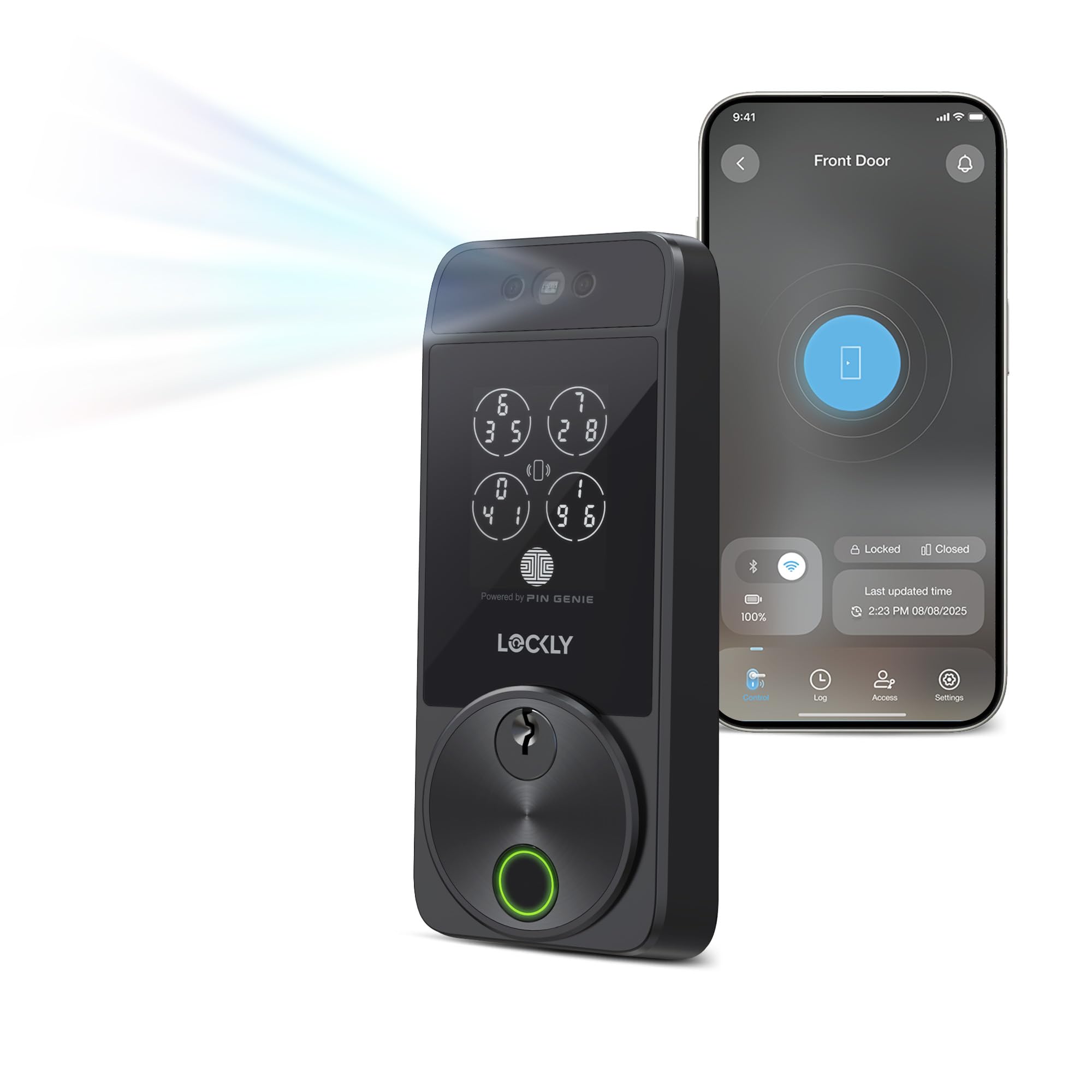
Lockly Visage Zeno Series Smart Lock – Best for Tech Lovers
This one is on another level. The Lockly Visage Zeno has facial recognition built right into it. You walk up to your door and it recognizes your face and unlocks. That’s not science fiction anymore. That’s your front door in 2026.
It also has fingerprint access, a keypad, and app control. So you have four different ways to get in. That kind of flexibility is great for households with kids, elderly family members, or anyone who isn’t comfortable with one specific method. Everybody gets their preferred way to unlock.
The Zeno connects to Wi-Fi and works with smart home systems. You can check if your door is locked from anywhere in the world. Forgot to lock up before a trip? Pull out your phone and lock it remotely. That peace of mind is hard to put a price on.
Installation is a bit more involved than a basic lock. But Lockly makes the process manageable with a detailed guide. If you’ve installed a regular deadbolt before, you can handle this. It fits standard door prep and replaces your existing deadbolt without major modifications.
Quick Summary:
- Facial recognition technology
- Fingerprint, keypad, and app access
- Remote control via Wi-Fi
- Smart home compatible
- Higher price point, but packed with features
Veise 2 Lever Handles Fingerprint Door Lock – Best for Interior Doors
Most keyless locks are deadbolts for front doors. The Veise is different. It’s a lever-handle lock with a built-in fingerprint reader, and it works beautifully for interior doors like home offices, bedrooms, or storage rooms where you want quick, private access.
The fingerprint reader is fast. We’re talking about half a second to recognize your print and unlock. You don’t need to fumble with a code or pull out your phone. Just press your finger and you’re in. For everyday use, that speed really matters.
It also has a keypad backup, so if your hands are wet or the reader ever misreads, you’ve got a second way in. That kind of redundancy is smart design. You’re never fully locked out because one method has an off day.
The build quality feels solid. It’s not flimsy plastic. The lever handles have some weight to them and they operate smoothly. You get two handles in the package, which covers both sides of the door. That’s good value, especially compared to locks that only include one side.
Quick Summary:
- Great for interior doors
- Super fast fingerprint recognition
- Keypad backup included
- Sturdy lever handle design
- Comes with two handles for both door sides
NICE DIGI Keypad Door Lock with Handle – Best All-in-One Design
The NICE DIGI combines a handle and keypad into one unit, so you don’t need a separate knob or lever alongside your lock. That all-in-one design keeps things clean and makes installation simpler. One piece to mount, and you’re done.
The keypad is backlit and easy to press, even with gloves on. That’s worth mentioning because if you live somewhere cold, pressing small buttons in gloves is genuinely annoying. The NICE DIGI handles that situation better than most. The buttons are spaced well and respond with a satisfying click.
You can store multiple user codes, which makes it practical for families or rental properties. If you manage an Airbnb or have frequent guests, you can assign each person a unique code and change it whenever you need. No rekeying, no lost keys, no drama.
Battery life is solid. You won’t be replacing batteries every month. And like most keypad locks, it’ll warn you when the batteries are getting low so you’re never caught off guard. Some versions also allow a 9V battery emergency override from the outside if needed.
Quick Summary:
- Handle and keypad in one unit
- Works well with gloves
- Supports multiple user codes
- Long battery life
- Good fit for rentals and Airbnb hosts
eufy E330 Security Video Smart Lock – Best for Whole-Home Security
The eufy E330 is more than a lock. It has a built-in video doorbell camera, fingerprint reader, keypad, and app control all in one device. If you’ve been thinking about getting both a smart lock and a video doorbell, this one saves you money and keeps things simple.
The camera records in clear quality and sends alerts to your phone when someone approaches your door. So even when you’re not home, you can see who’s knocking. You can talk to them through the app too, with two-way audio. That’s a real security upgrade for any home.
Fingerprint unlock is fast and accurate on this one. eufy has put solid hardware into it, and the sensor rarely misreads. You can register multiple fingerprints for different family members, and each one unlocks instantly. No codes to remember, no phone needed.
It works with the eufy Security app, which gives you a clean dashboard to manage everything. Lock status, camera feed, access history, all in one place. And it doesn’t require a subscription to use the basic features, which is a big plus compared to other brands that lock features behind a monthly fee.
Quick Summary:
- Built-in video doorbell camera
- Fingerprint, keypad, and app access
- Two-way audio with visitors
- No subscription required for core features
- Best overall value for security-focused buyers
I hope this guide helped you find exactly what you were looking for. Choosing a keyless lock doesn’t have to be confusing. Think about your door type, your budget, and how tech-savvy you want to go. Whether you pick a simple keypad or a face-recognition powerhouse, any of these six locks will make your home safer and your life easier. You’ve got great options. Go for it.
| Product | Best For | Key Feature | Price Range |
|---|---|---|---|
| TEEHO TE001 | Budget buyers | Weatherproof keypad | $ |
| Kwikset Obsidian | Design lovers | Sleek touchscreen | $$ |
| Lockly Visage Zeno | Tech enthusiasts | Facial recognition + Wi-Fi | $$$$ |
| Veise 2 Lever Handles | Interior doors | Fast fingerprint reader | $$ |
| NICE DIGI Keypad Lock | Rentals/families | All-in-one handle + keypad | $$ |
| eufy E330 | Security-first buyers | Video doorbell + fingerprint | $$$ |
Things to Consider Before Buying a Keyless Door Lock (Complete Guide)
Buying a keyless door lock sounds simple. But walk into the options online and you’ll quickly feel overwhelmed. There are fingerprint locks, Wi-Fi locks, Bluetooth locks, touchscreen locks, and about a hundred brands you’ve never heard of.
The truth is, the wrong lock can leave you frustrated, locked out, or just underwhelmed. Knowing the things to consider before buying a keyless door lock saves you money and a whole lot of headache.
Door Compatibility and Lock Type
Not every lock fits every door. This is the first thing you need to check, and a lot of people skip it. If your door has a standard bore hole, most locks will fit. But if your door is thicker than usual, made of steel, or has an unusual setup, you could run into problems.
Measure your door thickness before you buy anything. Most residential doors are between 1.375 and 1.75 inches thick. Some smart locks only fit within that range. Go outside that, and the lock either won’t mount properly or the latch won’t reach far enough to actually secure the door.
Also think about whether you need a deadbolt, a lever handle, or a knob-style lock. Front doors usually need deadbolts. Interior doors, like a home office or storage room, can work fine with a lever handle lock. Getting the wrong type means the lock won’t match how your door actually works.
- Check your door’s bore hole diameter (usually 2.125 inches)
- Measure door thickness before ordering
- Decide between deadbolt, lever, or knob based on the door’s purpose
- Steel and fiberglass doors may need special backsets
Entry Method Options
This is where things get fun. Keyless locks let you choose how you get in, and different methods suit different people. You’ve got PIN codes, fingerprints, smartphone apps, key fobs, and even facial recognition on some newer models. Each one has trade-offs.
PIN codes are the most common and the most reliable. They work without batteries doing anything fancy, and they’re easy to share with guests. But they’re only as secure as the code you pick. “1234” or your birth year is not a code. Use something random.
Fingerprint locks are fast and convenient. Press your finger, door opens. But wet or dirty hands can cause misreads. If you’re always coming in from the garden or gym, that’s worth thinking about. App-based locks are great for remote control but need your phone charged and nearby. Pick the method that fits your daily routine, not just the one that sounds coolest.
- PIN codes: reliable, easy to share, but only as strong as your choice
- Fingerprint: fast, but struggles with wet or dirty hands
- App control: great for remote access, needs phone and Wi-Fi
- Facial recognition: convenient but usually costs more
Connectivity and Smart Home Integration
Some locks are simple standalone devices. Others connect to your whole home system. If you use Alexa, Google Home, or Apple HomeKit, you’ll want a lock that plays nice with those. Not all of them do.
Wi-Fi locks let you control your door from anywhere. Forget to lock up before a trip? Open the app and lock it remotely. That’s genuinely useful. But Wi-Fi locks drain batteries faster and depend on your internet staying up. If your router goes down, remote features go with it.
Bluetooth locks are more energy-efficient but have a shorter range. They usually only connect when your phone is nearby. That works fine for most people, but it’s not great if you want to let someone in while you’re across town. Think about how you actually live before picking a connectivity type.
- Wi-Fi: remote control anywhere, higher battery drain
- Bluetooth: energy efficient, short range only
- Z-Wave/Zigbee: needs a smart home hub, very stable
- No connectivity: simple, reliable, no app required
Security Features and Ratings
A lock is only worth buying if it actually keeps your door secure. This sounds obvious but a lot of people focus on the tech features and forget to check the actual security rating. Don’t make that mistake.
Look for ANSI/BHMA grades. Grade 1 is the highest and best for front doors. Grade 2 is solid for residential use. Grade 3 is the weakest and honestly not worth putting on any exterior door. Most reputable brands will tell you the grade clearly in the product specs.
Also check for anti-tamper features. Good locks have auto-lockout after too many wrong code attempts. Some have tamper alarms that beep loudly if someone tries to force the lock. Others encrypt their wireless signals so they can’t be hacked remotely. These aren’t just nice extras. They’re the difference between a lock that protects you and one that just looks like it does.
- Look for ANSI Grade 1 for front doors
- Check for auto-lockout after failed attempts
- Encrypted wireless signals matter on Wi-Fi and Bluetooth locks
- Tamper alarms add a real layer of deterrence
Battery Life and Power Backup
Every keyless lock runs on batteries, and when they die, you need a plan. Some locks last a year on fresh batteries. Others, especially Wi-Fi-heavy ones, need a change every few months. That adds up faster than you’d think.
Most good locks warn you when batteries are getting low, either through an app alert, a beeping sound, or a flashing LED. Pay attention to those warnings. Don’t ignore them for two weeks and then wonder why you’re locked outside at 11pm in the rain. That’s a real scenario people deal with.
Some locks have a 9V battery terminal on the outside for emergency power. You press a battery against it, the lock gets enough juice to open once, and you can get inside to swap the batteries properly. That’s a feature worth having. Also check if the lock has a physical key override as a last-resort backup, even if you never plan to use it.
- Check estimated battery life before buying
- Look for low battery warnings via app or LED
- 9V emergency terminal is a smart backup feature
- Physical key override gives you a final failsafe
Installation and Setup
Some locks take 15 minutes to install. Others need professional help. Know which one you’re getting before you buy. Most single-cylinder deadbolt replacements are DIY-friendly. You just remove the old lock and mount the new one in the same holes.
Where it gets tricky is when your door doesn’t have standard prep, or when the lock requires wiring or hub installation. Video doorbells with built-in locks, like the eufy E330, need a bit more work because you’re mounting a camera and a lock at the same time. Read the installation guide before you buy, not after.
Setup matters too, not just installation. Some locks have clunky apps or confusing pairing processes. Look at user reviews and specifically search for comments about setup. If dozens of people say the app is broken or the Bluetooth connection drops constantly, believe them. A lock that works perfectly once set up is worth a lot more than one that keeps giving you trouble.
- Standard deadbolt replacement is usually DIY-friendly
- Video and Wi-Fi locks take longer to set up
- Read the app reviews, not just the lock reviews
- Check if firmware updates are easy or require special steps
I hope this breakdown helps you feel more confident about your next purchase. Covering the things to consider before buying a keyless door lock is exactly what protects you from buyer’s remorse. Take your time, match the lock to your lifestyle, and you’ll get something that works for years.
| Factor | What to Check | Why It Matters | Pro Tip |
|---|---|---|---|
| Door Compatibility | Bore hole size, door thickness, door material | Wrong fit means the lock won’t mount or latch correctly | Measure twice before ordering anything |
| Entry Method | PIN, fingerprint, app, fob, or facial recognition | Different methods suit different habits and households | Pick what fits your daily routine, not just what looks cool |
| Connectivity | Wi-Fi, Bluetooth, Z-Wave, or none | Determines remote access and smart home compatibility | Wi-Fi gives more range, Bluetooth saves more battery |
| Security Rating | ANSI/BHMA grade, auto-lockout, tamper alarm | Tells you how physically and digitally secure the lock actually is | Always go Grade 1 for exterior doors |
| Battery Life | Estimated lifespan, warning system, backup option | Dead batteries mean you could be locked out | Look for 9V emergency terminal as a backup |
| Installation | DIY or professional, app setup complexity | A lock you can’t set up properly is a lock that won’t work reliably | Read the installation reviews before buying, not after |
Frequently Asked Questions (FAQs)
Is it hard to install a keyless door lock yourself?
Not at all. Most keyless locks on this list are designed for DIY installation. If your door already has a standard deadbolt or lever hole, you can swap it out in 20 to 30 minutes with just a screwdriver. The TEEHO and NICE DIGI are especially beginner-friendly. Just follow the included instructions step by step and you’ll be fine.
Is it safe to use a fingerprint lock on my front door?
Yes, and in many ways it’s safer than a traditional key. Keys can be copied. Fingerprints can’t. Modern fingerprint sensors on locks like the eufy E330 and Veise are accurate and fast. They rarely misread a clean, dry finger. Just make sure the lock you choose also has a backup entry method like a keypad, so you’re never stuck outside.
Can someone hack into my smart lock?
It’s possible in theory, but unlikely with reputable brands. Locks like the Lockly Visage Zeno and eufy E330 use encrypted connections to protect your data. The bigger real-world risk is someone guessing a weak code. So use a strong, random PIN, and avoid obvious numbers like your birthday. Also, keep your app and lock firmware updated to stay protected.
Can I use these locks if I rent my apartment?
It depends on your lease and your landlord. Some landlords are fine with it, especially if you can restore the original lock when you leave. Most of these locks replace your existing deadbolt, so you’d just need to reinstall the old one when you move out. Always check with your landlord first. Some are actually happy about upgraded security.
Do I need Wi-Fi for a keyless lock to work?
No, not always. Locks like the TEEHO TE001 and Kwikset Obsidian work completely offline. You just use the keypad. Wi-Fi is only required if you want remote control features, like locking your door from your phone when you’re away. If you don’t need that, a simple keypad lock works just fine without any internet connection.
Can I give temporary access to someone without giving them my code?
Yes, many smart locks let you create temporary codes that expire after a set time. The NICE DIGI and Lockly Visage Zeno both support this. It’s perfect for letting in a house cleaner, a repair person, or a guest. Once their time window is up, that code stops working automatically. You stay in control without having to change your main code.
Do I need to replace the batteries often?
Not really. Most keyless locks last anywhere from 6 months to a year on a set of AA batteries, depending on how often the lock is used. Almost every lock on this list will give you a low battery warning before it dies, either through a beep, an LED signal, or an app notification. So you’ll always have time to swap them out before you’re in trouble.
Is it okay to use a keyless lock in extreme weather?
It depends on the lock. The TEEHO TE001 is specifically weatherproofed for outdoor use in rain, snow, and humidity. The eufy E330 and Lockly Visage Zeno are also built for outdoor conditions. If you live somewhere with harsh winters or heavy rain, make sure the lock you choose has a proper weatherproof rating. Don’t assume all locks can handle the elements.
Can multiple people use the same keyless lock?
Absolutely. That’s one of the biggest advantages of going keyless. You can store multiple codes, fingerprints, or app users depending on the lock model. The eufy E330 and Veise both support multiple fingerprints. The NICE DIGI lets you create multiple PIN codes. Each person gets their own way in, and you can remove access anytime without changing anything for everyone else.
Do I still need a physical key with these locks?
Most of the locks on this list don’t use physical keys at all, which is the whole point. A few models might include an emergency key override, but the day-to-day experience is fully keyless. The Kwikset Obsidian, for example, has no keyhole on the outside. Once you go keyless, you’ll wonder why you ever dealt with metal keys in the first place.