As an Amazon Associate, I earn from qualifying purchases at no extra cost to you.
KitchenAid Dishwasher Error Code 10-4: Fix It Now Like a Pro
 ByZayyan

The dishwasher stopped mid-cycle, water pooling at the bottom, and the display flashing 10-4 like it was mocking me. I yanked open the lower rack, grabbed my multimeter, and started pulling panels apart, trying not to flood the kitchen even more. The culprit wasn’t obvious, but I traced it down to the flow sensor and a sticky water inlet valve. In this article, I’ll show you exactly how to tackle this error without guessing.
First, cut power and water to the dishwasher and remove the lower panel to access the flow sensor. Disconnect it carefully, check resistance with a multimeter, then test the water inlet valve. Clear any clogs or mineral buildup, reassemble, and test with a short cycle. Make sure all wire connections are tight and latch panels securely. If the sensor is faulty, replace it with an OEM part, then run a full cycle to confirm the error is gone.
What Causes KitchenAid Dishwasher Error Code 10-4
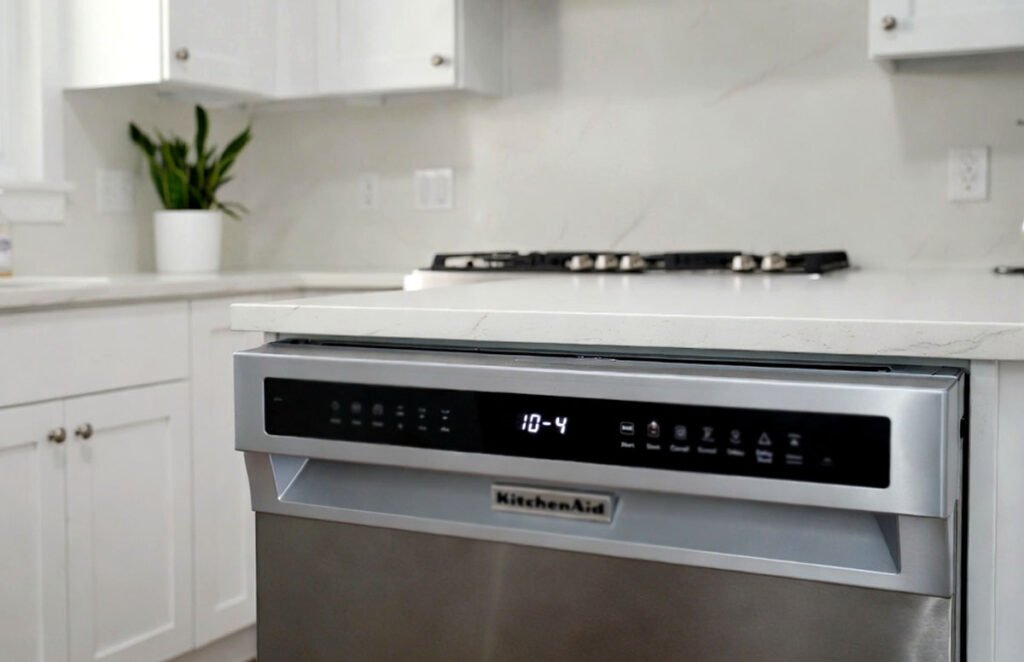
Error code 10-4 in a KitchenAid dishwasher typically points to a water flow problem. Most of the time, the machine detects that water is either not entering fast enough or that the flow sensor is sending erratic readings. This can happen when mineral deposits build up inside the inlet valve or on the flow sensor itself. Older homes with hard water are particularly prone to this, so even new machines can suddenly trigger the error after a few months.
Sometimes the wiring harness between the flow sensor and the control board gets loose or corroded. Even a tiny bend in the wire can change the resistance enough to trigger 10-4. I’ve seen cases where a hidden latch behind the lower kickplate wasn’t fully snapped, causing the sensor to misalign with the water tube. It’s tricky because the dishwasher still runs fine sometimes, only to fail mid-cycle.
Finally, there’s the control board itself. While less common, a fried triac or shorted input channel can report a false 10-4 error. This is often misdiagnosed as a sensor problem. Before swapping expensive boards, check the sensor resistance and valve operation carefully. Most people miss the tiny screens inside the inlet valve that clog with calcium deposits.
- Flow sensor blocked or damaged
- Water inlet valve partially clogged
- Loose or corroded wiring
- Misaligned sensor due to hidden latch issues
- Hard water mineral buildup
- Faulty control board
How to Fix Your KitchenAid Dishwasher Error Code 10-4
Step 1: Power Off and Access the Lower Panel
First, disconnect your dishwasher from power at the breaker and shut off the water supply. Slide the lower rack out, then remove the screws holding the kickplate or lower access panel. On most KitchenAid models, these are 1/4-inch hex screws, so grab a socket or nut driver. Don’t forget a towel underneath to catch drips. The panel usually snaps off with gentle force once screws are removed.
Once the panel is off, locate the flow sensor. It’s usually behind the tub near the sump and has a small clear plastic tube connected. Take a photo before disconnecting any wires to make reconnection easier. Use needle-nose pliers if clips are tight. Inspect the sensor for any visible debris or mineral buildup. Sometimes a tiny hair or food particle can trigger the error.
Finally, make sure nothing else is blocking access. Some models have a hidden latch behind the panel edges, so feel along the frame with your hand. A half-open latch can misalign the sensor and cause intermittent errors. Once you’re satisfied, set up your multimeter and prepare to test the sensor and inlet valve.
- Turn off power and water
- Remove 1/4-inch screws on the lower panel
- Snap off the panel carefully
- Locate flow sensor behind the sump
Step 2: Test the Flow Sensor
Start by checking the flow sensor’s resistance. Set your multimeter to the ohms setting. Disconnect the sensor’s wiring harness and measure across its terminals. Most KitchenAid sensors should read between 900 and 1400 ohms cold. Anything outside that range means the sensor is faulty. Don’t ignore slight fluctuations; these often cause intermittent 10-4 errors.
Next, visually inspect the sensor wheel. If it’s stuck or coated with mineral deposits, it won’t spin freely, which tricks the control board into thinking water isn’t flowing. Use white vinegar or a mild descaling solution to dissolve buildup. A small cotton swab works wonders to clean inside crevices. Make sure the wheel spins smoothly after cleaning.
Finally, reconnect the sensor and double-check the wiring harness for corrosion or bent pins. Even a slightly corroded connection can cause error 10-4 to appear randomly. After reconnection, run a diagnostic cycle if your model allows it to see if the flow sensor is operating normally.
- Measure sensor resistance 900–1400 ohms
- Inspect and clean the sensor wheel
- Check wiring harness for corrosion
- Spin the wheel freely after cleaning
Step 3: Inspect the Water Inlet Valve
The water inlet valve controls how much water enters the dishwasher. A partially clogged valve often triggers error 10-4. Remove the valve, usually held with two 5/16-inch screws, and disconnect the water supply line. Inside, there’s a fine mesh screen that catches debris. Mineral buildup or small particles can restrict flow.
Rinse the screen under running water, and for stubborn deposits, soak in vinegar for 15–20 minutes. Inspect the valve coil for burn marks or signs of wear. You can test the coil with a multimeter; typical resistance is between 400–600 ohms. If the reading is off, replace the valve with an OEM part. Non-OEM replacements often fail sooner and can cause the same error again.
Before reinstalling, make sure the valve aligns correctly with the mounting bracket and tubing. Even a slight misalignment can stress the flow sensor. Reconnect all wires snugly and tighten water supply fittings. Turn on water slowly to check for leaks before powering up the dishwasher.
- Remove 5/16-inch screws
- Clean mesh screen thoroughly
- Test valve coil 400–600 ohms
- Reinstall aligned with bracket
Step 4: Check Wiring and Connections
Even with a good sensor and valve, loose wires can ruin a repair. Inspect the harness from the control board to the flow sensor and inlet valve. Look for bent pins, corrosion, or chafing against metal edges. Sometimes the wiring passes behind panels, and a small pinch can change resistance enough to trigger 10-4.
Use a multimeter continuity test for each wire. Disconnect both ends and check that each wire completes the circuit. If a wire fails, either repair it with a butt connector and heat shrink or replace the entire harness. It’s better to do it right the first time than chase random errors later.
Finally, make sure all connectors snap fully into place. KitchenAid sensors often have hidden tabs that click into the plug housing. If you miss these, the connection will look connected but act like it’s not. After securing wires, lightly tug on each to confirm stability.
- Inspect harness for corrosion or chafing
- Test continuity with multimeter
- Repair or replace faulty wires
- Ensure all connectors click into place
Step 5: Reassemble Panels and Test
Once the sensor, valve, and wiring are fixed, start putting the dishwasher back together. Reattach the lower panel, snapping any hidden latches first, then tighten screws. Replace the lower rack. Don’t forget to remove towels or tools from inside.
Power up the dishwasher and run a short diagnostic or rinse cycle. Watch for error codes and listen to water flow. The 10-4 should be gone if the flow sensor and valve are operating correctly. Sometimes a second short cycle is needed to flush air bubbles from the system.
Finally, check for leaks around the inlet valve and under the tub. Even a minor drip can eventually cause sensor errors. Tighten fittings gently but firmly. A proper test cycle confirms the repair, giving confidence that the problem won’t return quickly.
- Reattach lower panel and snap latches
- Tighten screws and replace rack
- Run short diagnostic cycle
- Check for leaks
Step 6: Replace Parts if Necessary
If the flow sensor or inlet valve still fails after cleaning and testing, replacement is your only option. Always choose OEM parts; aftermarket versions often fail within months. Order by your dishwasher’s model number to ensure fit and electrical compatibility.
Installation is straightforward: align the new sensor or valve with brackets and tubing, reconnect wires, and secure screws. Double-check orientation; some sensors must face a specific direction for proper water measurement. After replacement, run a full cycle to verify that error 10-4 does not reappear.
Keep old parts until the dishwasher runs perfectly. They can help diagnose any lingering issues if something else goes wrong. Document resistance readings before replacement for future reference. Proper installation plus verification ensures a durable fix.
- Choose OEM replacement parts
- Align sensor/valve properly
- Reconnect wires securely
- Run full cycle to confirm
How to Prevent KitchenAid Dishwasher Error Code 10-4
Preventing error 10-4 is all about keeping water flowing cleanly. Start by running a monthly rinse cycle with a dishwasher-safe descaler. Hard water builds up minerals inside the inlet valve and flow sensor, causing blockages. Even a small amount of buildup can trigger the error. Regular cleaning keeps sensors spinning freely and valves operating smoothly.
Check the wiring and hidden latches at least twice a year. Vibrations from normal operation can loosen plugs or misalign sensors. A quick visual inspection of the harness and panel latches can save hours of troubleshooting later. Pay attention to any frayed wires or corrosion spots.
Finally, filter your water if you live in a hard water area. A simple inline water softener reduces calcium buildup in valves and sensors. Keep the dishwasher’s mesh filters clean, and never overload the lower rack, which can block water flow. Preventive maintenance avoids frustration and keeps the appliance reliable for years.
- Run monthly descaler cycle
- Inspect wiring and latches twice yearly
- Use water softener if needed
- Clean mesh filters regularly
- Avoid overloading lower rack
- Check for leaks or loose fittings
Final Thoughts
Fixing a KitchenAid dishwasher error 10-4 takes patience, but knowing exactly where to look saves a lot of time and stress. Flow sensors, valves, and wiring are usually the culprits, and cleaning or replacing them solves most cases. Take your time, use a multimeter, and follow each step carefully. Once repaired, your dishwasher will run smoothly without mysterious errors.
| Steps | Difficulty Level | Parts Needed | Pro Tip |
|---|---|---|---|
| Power Off and Access | Easy | Nut driver 1/4-inch | Use a towel to catch drips |
| Test Flow Sensor | Medium | Multimeter | Spin sensor wheel freely |
| Inspect Water Inlet Valve | Medium | 5/16-inch screwdriver, vinegar | Soak screen to remove calcium |
| Check Wiring and Connections | Medium | Multimeter | Tug gently to confirm connectors |
| Reassemble Panels and Test | Easy | None | Snap hidden latches first |
| Replace Parts if Needed | Medium | OEM sensor/valve | Note resistance readings before replacement |
Frequently Asked Questions (FAQs)
Is it safe to run a dishwasher with error 10-4?
No, running a dishwasher with error 10-4 can lead to flooding or damage to the pump and control board. The error signals improper water flow, which can cause overheating or mechanical stress. Fix the flow sensor or inlet valve before using it again.
Can I clean the flow sensor without removing it?
Partially, yes. You can wipe accessible parts with a cotton swab and vinegar, but thorough cleaning requires removing the sensor to ensure the wheel spins freely. Full removal prevents leaving debris inside that triggers error 10-4.
Do I need a multimeter for this repair?
Yes, a multimeter is essential. It measures the flow sensor and valve resistance to confirm functionality. Without it, you may replace parts unnecessarily or miss intermittent failures.
Is the water inlet valve the main cause of error 10-4?
Often, yes. A clogged or partially blocked inlet valve restricts water flow, causing the sensor to report an error. Cleaning or testing the valve usually resolves the issue.
Can wiring issues alone trigger error 10-4?
Absolutely. Loose connectors, corroded pins, or pinched wires can change resistance readings, falsely triggering the error even if the sensor and valve are fine.
Do OEM parts really matter for replacement?
Yes, OEM parts match the sensor and valve tolerances perfectly. Aftermarket versions may fit physically but often fail electrically or mechanically, causing repeat error 10-4 problems.
Is hard water a factor in this error?
Definitely. Hard water deposits calcium and minerals inside the valve and sensor, slowing water flow. Regular descaling and water softening prevent error 10-4 from recurring.
Can I bypass error 10-4 temporarily?
No, bypassing the error is risky. It signals a real water flow problem, and ignoring it can lead to flooding or damage. Proper repair or replacement is the only safe solution.