As an Amazon Associate, I earn from qualifying purchases at no extra cost to you.
6 Best Smart Door Locks (Buying Guide) 2026
 ByZayyan

Tired of fumbling with keys at your front door? You’re not alone. Most people don’t realize how much a smart lock changes daily life until they try one. In this article I will show you the top 6 best smart door lock options worth your money right now, what makes each one great, and which one fits your home best.




Top 6 Best Smart Door Locks You Can Buy Now
eufy E330 Security Video Smart Lock – Best All-in-One with Built-In Camera
This one is wild. The eufy E330 isn’t just a smart lock. It’s a lock, a doorbell, and a camera all rolled into one. If you’ve ever wished you could see who’s at the door without opening an extra app or buying a separate video doorbell, this is your answer. The camera shoots in 2K resolution, which is sharp enough to see faces clearly even at night.
The fingerprint scanner is fast. We’re talking under a second. You can store up to 100 fingerprints, so your whole family is covered. No more making spare keys for the babysitter or the dog walker. Just add their fingerprint and you’re good.
Setup takes maybe 30 minutes if you’ve done this kind of thing before. A bit longer if you haven’t, but the eufy app walks you through every step. The app itself is clean and easy to use. You get real-time alerts whenever someone unlocks the door or rings the bell.
Battery life is solid, around 4 months on a full charge. The lock also works without Wi-Fi using Bluetooth, so you won’t get locked out if your router dies. One thing to watch out for: the lock is bulkier than most because of the camera. Make sure your door frame has enough clearance before buying.
- Built-in 2K camera and video doorbell
- Stores up to 100 fingerprints
- Works via fingerprint, code, app, or key
- About 4 months of battery life
- Requires a bit more door clearance due to size
Yale YRD450 Assure Smart Lock – Best for Clean, Minimalist Design
Yale has been making locks for over 180 years. So yeah, they know what they’re doing. The YRD450 looks like something out of a modern apartment catalog. Sleek, slim, and no keyhole in sight. If you hate the look of traditional deadbolts, you’ll love this one.
It connects directly to Wi-Fi, so no hub needed. That’s a big deal. A lot of smart locks need a separate smart home hub to work remotely, but not this one. You open the Yale app and you’re in control from anywhere. See who unlocked the door. Let in a guest. Lock up when you forgot to before leaving. All from your phone.
You can set up to 250 access codes. That’s a lot. You can assign temporary codes for guests that expire automatically. Great for Airbnb hosts or anyone who has people coming and going. The touchscreen keypad is easy to use and lights up clearly at night.
One thing I genuinely appreciate: Yale locks are super easy to install. If you can use a screwdriver, you can install this yourself in under 20 minutes. And because there’s no key cylinder, there’s no lock picking either. That’s a real security win. The only downside is it doesn’t have a fingerprint reader, which some people prefer.
- No key cylinder, no picking
- Connects to Wi-Fi without a hub
- Stores up to 250 access codes
- Easy 20-minute installation
- No fingerprint option
Schlage BE489WB Encode Smart Wi-Fi Deadbolt Lock – Best for Security-First Buyers
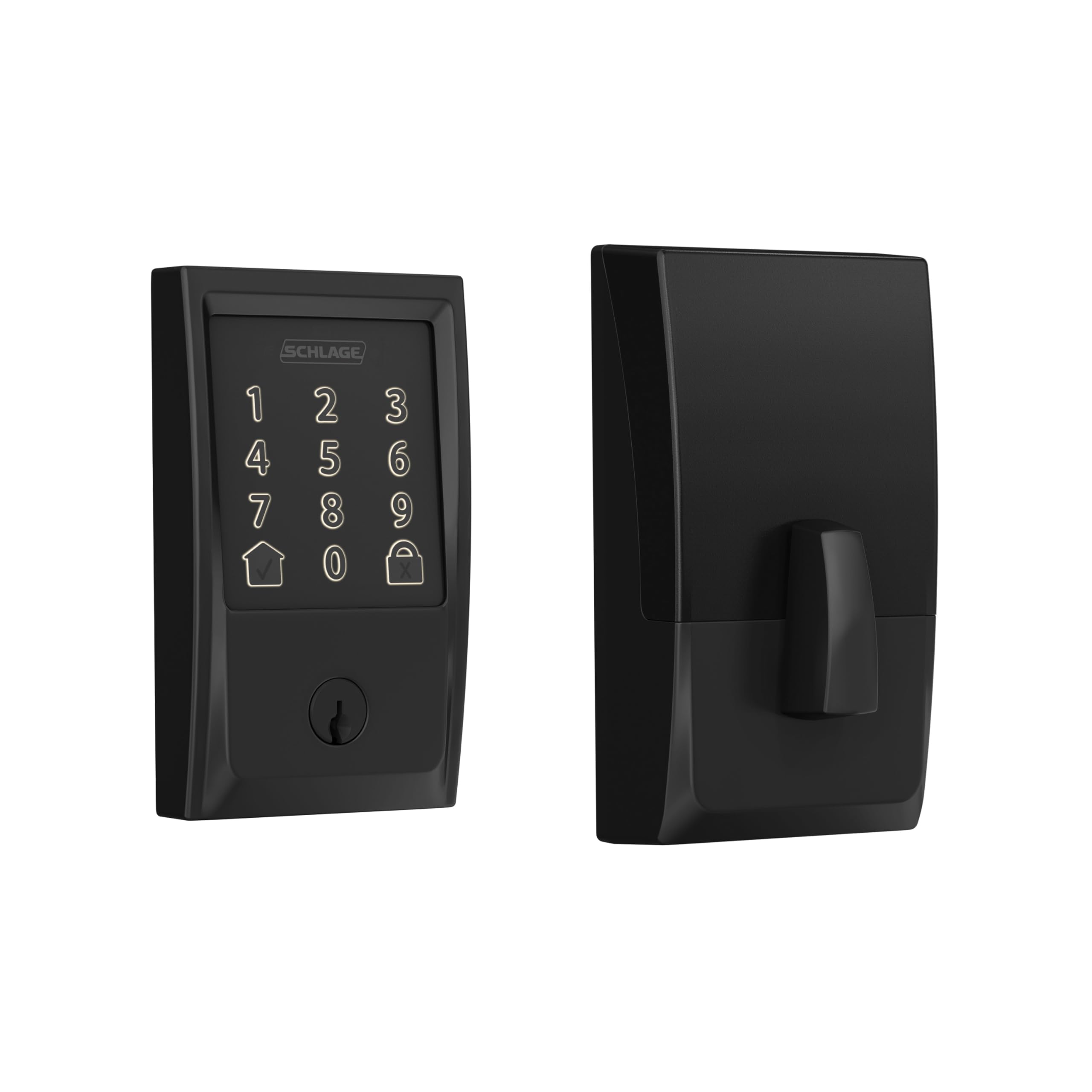
Schlage is the brand most locksmiths recommend. The BE489WB has a Grade 1 ANSI rating, which is the highest residential security rating you can get. If you care deeply about keeping your home safe, this is where you start.
Like the Yale, it connects directly to Wi-Fi. No hub, no extra equipment. The Schlage Home app is straightforward and works reliably. You can create up to 100 access codes and check your lock history anytime. It also works with Amazon Alexa and Google Home if you use smart speakers.
The built-in alarm is something most people overlook, but it’s genuinely useful. The lock senses if someone is trying to force the door open and triggers an alert. That kind of feature matters in neighborhoods where break-ins happen.
Installation is DIY-friendly. The instructions are clear, and everything you need comes in the box. One thing to know: the Schlage app is functional but not the prettiest. It gets the job done without being flashy. Also, there’s no fingerprint reader here either. But honestly, if physical security is your main concern, this lock delivers more than enough peace of mind.
- ANSI Grade 1 security rating
- Built-in door alarm
- Works with Alexa and Google Home
- Up to 100 access codes
- No fingerprint reader
ULTRALOQ U Bolt Pro WiFi Smart Lock – Best for Multiple Unlocking Options
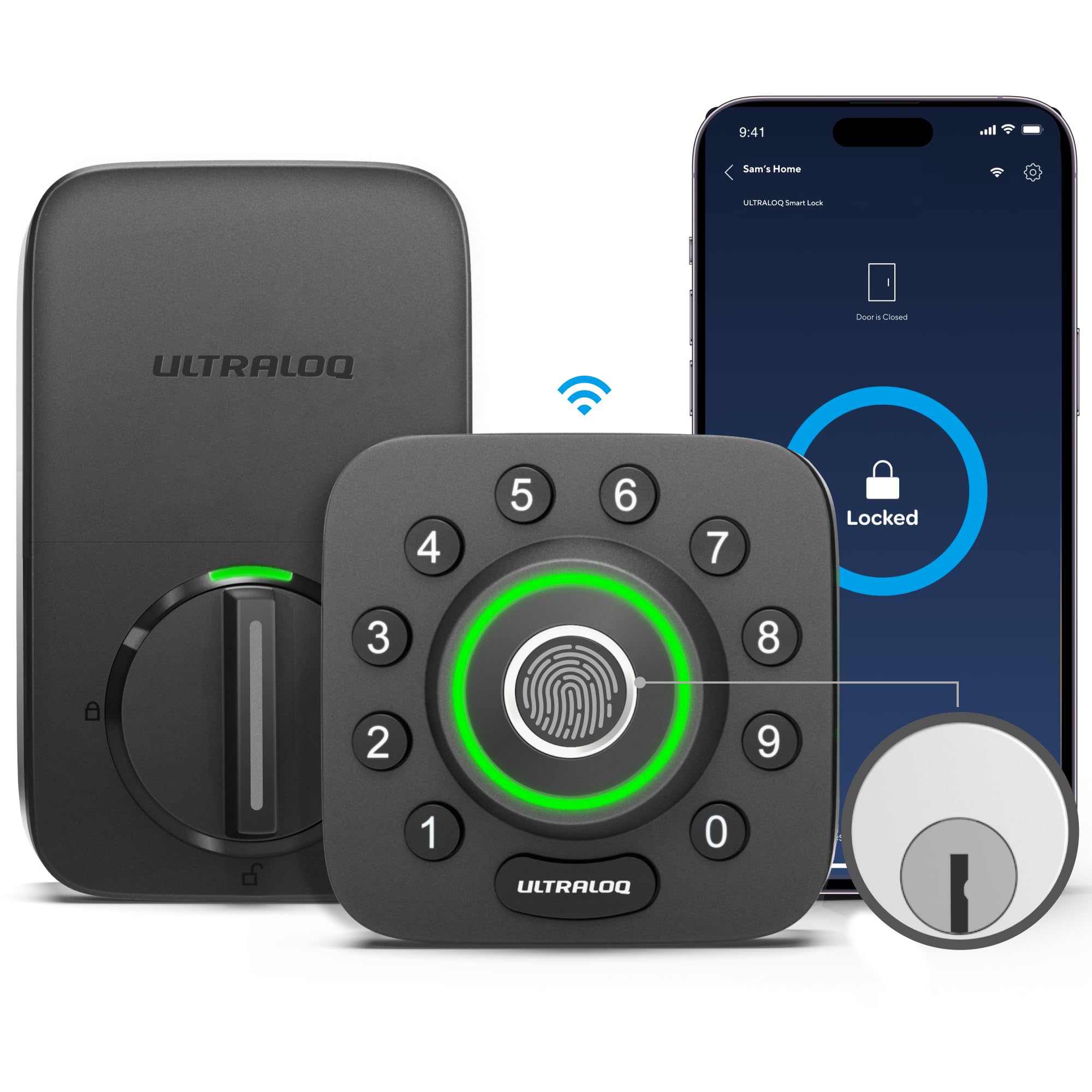
If you like options, the ULTRALOQ U Bolt Pro is the lock for you. It gives you six ways to unlock your door: fingerprint, PIN code, app, key fob, auto-unlock when you approach, and a physical key. Six. That’s more than any other lock on this list.
The fingerprint reader is fast and accurate. It reads fingers even if they’re slightly wet or dirty, which matters more than people think. Cold winters and sweaty summers can mess with cheaper fingerprint scanners. This one holds up.
It’s rated IP65, meaning it’s dustproof and handles heavy rain without any issues. Great for homes in harsh climates. The auto-unlock feature is one of those things you didn’t know you needed. It detects your phone approaching and unlocks automatically. Feels like magic the first time it happens.
Setup takes a little longer than the Yale or Schlage, but it’s not hard. The app is decent. Nothing fancy, but it works. You can share access with family members easily and check activity logs in real time. Watch out for the battery life though. It’s shorter than some competitors, so keep an eye on it and replace batteries every 3 to 6 months depending on usage.
- Six ways to unlock the door
- IP65 weather resistance
- Auto-unlock feature
- Fingerprint works even when wet
- Battery needs replacing every 3-6 months
Aqara U100 Smart Lock – Best for Apple HomeKit Users
If you live in the Apple ecosystem, the Aqara U100 is basically made for you. It’s one of the very few smart locks with native Apple HomeKit support. That means you can use Siri to lock and unlock your door. No joke. “Hey Siri, lock the front door” actually works.
The fingerprint scanner is quick and reliable. The touchscreen looks premium, and the build quality feels solid. It also supports NFC, so you can unlock using an NFC card or even your Apple Watch. That’s a really nice touch, especially when your hands are full of groceries.
The Aqara app connects with a huge range of smart home devices, so if you already have Aqara sensors or cameras around the house, everything talks to each other smoothly. You can set automations, like locking the door automatically when you leave home.
One honest heads-up: if you don’t use Apple products, this lock loses a lot of its appeal. Android support exists but feels like an afterthought. Also, it doesn’t have built-in Wi-Fi. You need an Aqara hub or Apple HomePod to use it remotely. That’s an extra cost to keep in mind before buying.
- Native Apple HomeKit support
- Siri and Apple Watch compatible
- NFC card unlocking
- Great smart home automation options
- Needs a hub for remote access
Wyze Lock Bolt Smart Bluetooth Deadbolt – Best Budget Pick
Not everyone needs to spend $200 on a smart lock. If you want something simple and affordable that just works, the Wyze Lock Bolt is exactly that. It costs way less than most smart locks on this list, and it doesn’t cut corners where it counts.
The fingerprint scanner is fast and reliable. The build feels sturdy for the price. You can store up to 50 fingerprints and set multiple PIN codes for family and guests. It also has a physical key backup, so you’re never truly locked out.
Installation is genuinely easy. It fits most standard deadbolt holes, so you’re probably not doing any extra drilling. Wyze keeps the app clean and simple. You get activity alerts, auto-lock settings, and guest access management without any confusion.
The big trade-off is Bluetooth only. No Wi-Fi, no remote access from across town. You have to be near the lock to control it through the app. That might be a dealbreaker for some people, but for others, it’s actually a feature, not a bug. Less internet exposure means fewer security risks. If you mostly want a hands-free, keyless entry experience at a fair price, this lock makes total sense.
- Very affordable price point
- Stores up to 50 fingerprints
- Easy installation on standard doors
- Bluetooth only, no remote access
- Great for budget-conscious buyers
I hope this guide made choosing your next smart lock a lot easier. Every lock on this list is worth it, depending on what matters most to you. Want a camera too? Go with the eufy E330. On a budget? Wyze Lock Bolt is your friend. Love Apple? Aqara U100 all the way. Pick the one that fits your life, install it this weekend, and enjoy never digging for keys again.
| Product | Best For | Fingerprint | Wi-Fi / Bluetooth | Approx. Price |
|---|---|---|---|---|
| eufy E330 | All-in-one with camera | Yes | Wi-Fi | $$$ |
| Yale YRD450 | Minimalist design | No | Wi-Fi (no hub) | $$$ |
| Schlage BE489WB | Top security | No | Wi-Fi (no hub) | $$$ |
| ULTRALOQ U Bolt Pro | Multiple unlock options | Yes | Wi-Fi + Bluetooth | $$ |
| Aqara U100 | Apple HomeKit users | Yes | Bluetooth + Hub | $$ |
| Wyze Lock Bolt | Budget buyers | Yes | Bluetooth only | $ |
Things to Consider Before Buying a Smart Door Lock (Complete Guide)
Buying a smart lock sounds simple. But walk into that product page without a plan, and you’ll quickly feel overwhelmed. There are dozens of options, confusing specs, and features you’re not sure you even need.
Knowing the right things to consider before buying a smart door lock saves you from wasting money, dealing with a bad install, or ending up with a lock that doesn’t actually fit your door or your life.
Compatibility with Your Door and Existing Deadbolt
Most people skip this step. Then they buy the lock, open the box, and realize nothing fits. Don’t be that person. Before anything else, check your door thickness and your current deadbolt size. Most smart locks fit doors between 1.375 and 2 inches thick. If your door is thicker, like a solid wood exterior door on an older home, you may need an adapter or a different model entirely.
Also check your backset. That’s the distance from the edge of your door to the center of the deadbolt hole. Standard backsets are either 2.375 inches or 2.75 inches. Measure yours before ordering. Some locks only support one size.
The good news is most smart locks are designed to work with your existing deadbolt hole. You usually don’t need to drill anything new. But double-checking takes five minutes and saves you a trip to the hardware store.
- Measure your door thickness before buying
- Check your backset size (2.375 or 2.75 inches)
- Look for adapter kits if your door is non-standard
- Most locks replace only the interior side, keeping your exterior hardware
Connectivity: Wi-Fi vs. Bluetooth vs. Z-Wave
This is where people get confused. Smart locks connect to your home in different ways, and each one comes with trade-offs. Wi-Fi locks let you control your door from anywhere in the world. You’re at work and want to let in a plumber? Easy. But Wi-Fi drains batteries faster. That’s just how it works.
Bluetooth locks are more energy efficient. They’re also more secure in some ways because they’re not constantly connected to the internet. The downside is you need to be close to your door, usually within 30 feet, to use the app. No remote access unless you add a hub.
Z-Wave and Zigbee locks work with smart home systems like SmartThings or Amazon Echo. They’re reliable and battery-friendly. But they need a compatible hub to function. If you don’t already have one, that’s an extra cost to factor in.
- Wi-Fi: best for remote access, shorter battery life
- Bluetooth: energy efficient, no remote access without a hub
- Z-Wave/Zigbee: smart home friendly, requires a compatible hub
- Some locks combine Wi-Fi and Bluetooth for the best of both
Unlock Methods and Access Options
Think about how you actually want to open your door. Some days your hands are full of groceries. Some days your phone is dead. The best smart locks give you multiple ways in, so you’re never stuck outside your own home.
Fingerprint readers are fast and convenient. Top models read your fingerprint in under a second. PIN keypads are reliable and great for sharing access without handing out your phone. Key fobs are less common but useful for older family members who don’t use smartphones. And a physical key backup is always worth having, just in case.
Some locks also offer auto-unlock. Your phone detects that you’re approaching and the door opens on its own. It sounds like magic. And honestly, once you try it, going back feels weird. But auto-unlock can sometimes trigger when you’re near the door from inside, so read reviews on accuracy before committing.
- Fingerprint: fast and keyless, great for daily use
- PIN keypad: easy to share with guests or family
- App control: useful for remote locking and guest access
- Physical key backup: always worth having as a safety net
- Auto-unlock: convenient but check accuracy in real reviews
Smart Home Integration and App Quality
A smart lock that doesn’t play nice with your existing setup is more annoying than helpful. If you use Amazon Alexa, make sure the lock works with Alexa. If you’re deep into the Apple ecosystem, look for HomeKit support. Google Home users need to check compatibility too. This stuff matters more than people think.
App quality is just as important. A bad app kills the experience fast. Look for apps with high ratings in the App Store or Google Play and pay attention to recent reviews, not just the overall score. Old five-star reviews can hide current issues like bugs, failed updates, or poor customer support.
Also check if the lock stores access codes locally or in the cloud. Local storage means the lock still works if the company’s servers go down. Cloud-only storage means an outage could leave you locked out. That’s a real risk worth thinking about before you buy.
- Check compatibility with Alexa, Google Home, or Apple HomeKit
- Read recent app reviews, not just overall ratings
- Look for local storage of access codes for reliability
- Avoid locks from brands with poor support reputations
Weather Resistance and Build Quality
Your front door faces the elements every single day. Rain, heat, freezing cold, humidity. A lock that isn’t built for it will fail faster than you’d expect. Always check the IP rating before buying. IP65 means the lock handles dust and heavy rain. IP44 means it’s fine for light splash but not a downpour. Big difference if you live somewhere with serious winters or summer storms.
Build quality matters too. A lock that feels flimsy in your hand probably is. Metal construction lasts longer than plastic, especially for the keypad and fingerprint sensor. Some cheaper locks develop keypad sensitivity issues after a year or two, especially in extreme heat or cold.
Brands like ULTRALOQ and eufy are known for solid weather resistance. If you live somewhere mild, this matters less. But if your winters are brutal or your summers are humid, pay close attention to the IP rating and user reviews from people in similar climates.
- Look for IP65 rating for heavy rain protection
- Metal construction lasts longer than plastic
- Read reviews from users in similar climates
- Avoid cheaply made keypads if you live in temperature extremes
Battery Life and Low Battery Alerts
Every wireless smart lock runs on batteries. And the last thing you want is to come home at midnight and find a dead lock. Battery life varies a lot depending on the lock type and how often you use it. Wi-Fi locks tend to drain faster because they’re always connected. Bluetooth locks stretch battery life further.
Most smart locks run on AA or AAA batteries and last anywhere from 3 to 12 months. Some premium models use rechargeable batteries. Both work fine, but rechargeable ones save money over time. Just make sure you have a charging cable nearby or a backup set of batteries ready.
Good smart locks send you a low battery alert through the app well before things get critical. That’s a feature worth confirming before you buy. Some cheaper models only show a blinking light on the lock itself, which you might not notice until it’s too late.
- Wi-Fi locks drain batteries faster than Bluetooth models
- Most locks last 3-12 months per battery set
- Rechargeable battery models save money long term
- Always confirm the lock sends low battery alerts to your phone
I hope this breakdown makes it easier to pick the right lock for your home. Understanding the key things to consider before buying a smart door lock keeps you from making a costly mistake. Take your time, match the features to your real life, and you’ll end up with a lock that works hard every single day without giving you any headaches.
| What to Check | Why It Matters | What to Do | Watch Out For |
|---|---|---|---|
| Door compatibility | Wrong fit means the lock won’t install | Measure door thickness and backset before ordering | Non-standard doors may need adapters |
| Connectivity type | Affects remote access and battery life | Choose Wi-Fi for remote access, Bluetooth to save battery | Hub-dependent locks cost more to set up |
| Unlock methods | Determines how easy daily use feels | Look for at least 3 unlock options including a key backup | Auto-unlock can misfire if not well-reviewed |
| Smart home compatibility | A mismatched lock won’t work with your devices | Confirm Alexa, Google Home, or HomeKit support before buying | Some locks only work with their own app |
| Weather resistance | Outdoor locks face sun, rain, and cold daily | Look for IP65 rating for heavy weather areas | Cheap plastic keypads fail fast in heat or cold |
| Battery life and alerts | Dead batteries lock you out | Choose locks with app-based low battery alerts | Some cheap models only flash a light on the lock |
Frequently Asked Questions (FAQs)
Is it hard to install a smart lock yourself?
Honestly, most smart locks are designed for DIY installation. If your door already has a standard deadbolt, you’re halfway there. Most locks come with everything you need in the box and have clear step-by-step instructions. The Yale and Schlage models on this list take around 20 minutes. Even if you’re not handy, you can do it with a basic screwdriver.
Is it safe to use a smart lock on my front door?
Yes, and in many ways smart locks are safer than traditional locks. They eliminate the risk of someone copying your physical key. You can set temporary codes for guests and delete them when you’re done. Many models also have built-in alarms for forced entry attempts. Just make sure you use a strong PIN and update your app regularly.
Can smart locks work without Wi-Fi?
Some can, some can’t. The Wyze Lock Bolt works via Bluetooth only, no Wi-Fi needed. The ULTRALOQ also uses Bluetooth and works without internet access. But Wi-Fi locks like the Yale YRD450 and Schlage BE489WB lose remote access features if your internet goes down. The lock itself still works locally though, so you won’t get locked out.
Can I still use a regular key with a smart lock?
Most smart locks include a physical key backup, including the Wyze Lock Bolt and ULTRALOQ U Bolt Pro. The Yale YRD450 is one exception, it has no key cylinder at all. That’s a design choice meant to improve security by eliminating lock-picking risks. So it really depends on which model you choose.
Do I need a smart home hub to use these locks?
Not always. The Yale YRD450 and Schlage BE489WB connect directly to Wi-Fi, no hub required. But the Aqara U100 needs an Aqara hub or Apple HomePod for remote access. If you’re buying your first smart home device and don’t want extra equipment, go with a lock that has built-in Wi-Fi.
Is it possible to share access with family members?
Absolutely. Every lock on this list lets you share access. You can add family members through the app, assign them their own PIN codes, or let them use the app on their own phones. Some locks, like the ULTRALOQ, even let you store multiple fingerprints so different people can unlock with their own finger.
Can smart locks be hacked?
Any connected device has some level of risk, and smart locks are no different. That said, reputable brands use strong encryption to protect your data and access. The bigger practical risk is a weak PIN code or a poorly secured app account. Use a strong, unique password for your lock app and turn on two-factor authentication if available. That eliminates most real-world risk.
Do smart locks drain batteries fast?
It depends on the model and how often you use it. Most smart locks last anywhere from 3 to 12 months on a set of AA batteries. The eufy E330 runs about 4 months on a charge. The Wyze Lock Bolt lasts longer since it only uses Bluetooth. Most locks will send you a low battery alert through the app before things get critical, so you won’t be caught off guard.
Is it worth spending more on a premium smart lock?
If you use your front door multiple times a day and want features like remote access, video monitoring, or Apple HomeKit integration, then yes, spending more makes sense. But if you just want keyless entry and a fingerprint reader, the Wyze Lock Bolt proves you don’t need to spend a lot to get a great experience. Match the price to your actual needs.
Can smart locks work in extreme weather?
Some are rated for it, some are not. The ULTRALOQ U Bolt Pro has an IP65 rating, meaning it handles heavy rain and dust without issues. The eufy E330 and Aqara U100 are also weather-resistant. If you live somewhere with harsh winters or heavy rain, check the weather rating before buying. Installing a lock that can’t handle your climate is a problem you’ll notice pretty quickly.