As an Amazon Associate, I earn from qualifying purchases at no extra cost to you.
6 Best Electronic Door Locks (Buying Guide) 2026
 ByZayyan

Losing your keys is one of those small disasters that ruins your whole day. And if you’ve ever stood outside your own front door at midnight, you know exactly what I mean. In this article, I will show you the top 6 best electronic door lock options worth your money right now, so you can stop worrying and start living safer.


Top 6 Best Electronic Door Locks You Can Buy Now
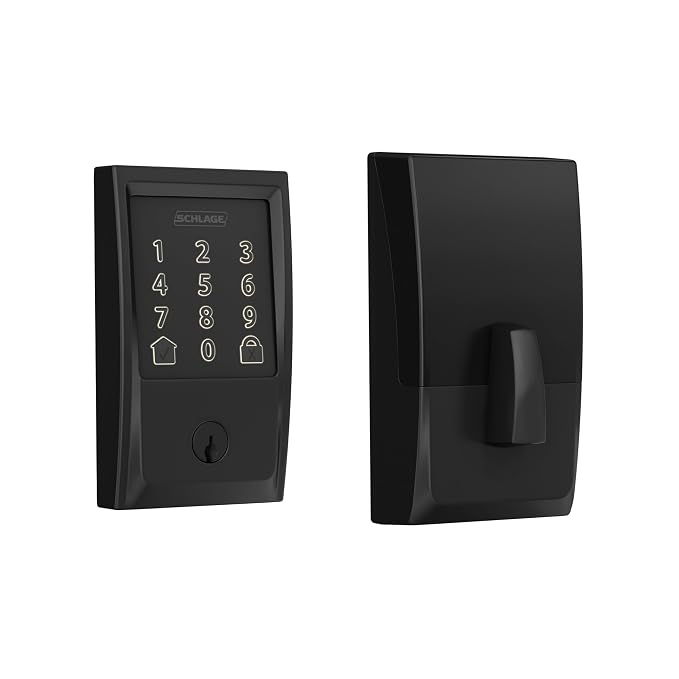
Schlage Encode Smart Wi-Fi Deadbolt Lock – Best for Built-In Wi-Fi
The Schlage Encode is one of those locks that just works right out of the box. No extra hub. No bridge device. No fiddling with your router for hours. It connects directly to your Wi-Fi, and you’re done. That alone puts it ahead of half the competition.
What really stands out is the built-in alarm. It detects door activity and alerts you if someone’s messing with it. That’s not a gimmick. That’s a real layer of security most locks skip entirely. Schlage also gives you up to 100 access codes, which is perfect if you have family, guests, or a dog walker coming through.
The keypad feels solid. Grade 1 certified, which is the highest residential security rating you can get. This lock isn’t going to rattle apart after a year. It’s built to last.
The app is simple too. You can check if your door is locked from anywhere, hand out codes remotely, and set schedules. If you forget to lock up before a trip, this lock has your back.
- Built-in Wi-Fi, no hub needed
- Up to 100 access codes
- Built-in alarm technology
- ANSI Grade 1 certified
- Works with Alexa and Google Assistant
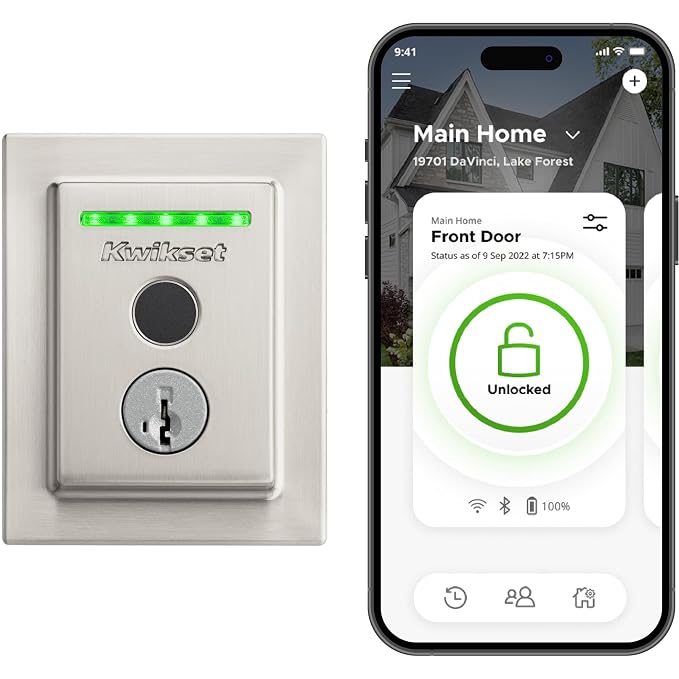
Kwikset Halo Touch Fingerprint Wi-Fi Smart Lock – Best for Fingerprint Speed
Fingerprint locks sound futuristic until you actually use one. Then you wonder how you ever lived without it. The Kwikset Halo Touch reads your print in under a second. You just touch and push. That’s it.
It stores up to 100 fingerprints, so your whole family can get in without keys or codes. Kids especially love this. No more lost key drama. No more “I forgot my code” texts at 3pm. Everyone just walks in.
Wi-Fi is built in here too. So you get remote access, lock history, and the ability to manage everything from your phone. The app is clean and easy to use. You don’t need to be a tech person to figure it out.
The design is sleek. It comes in multiple finishes, so it won’t look out of place on a nice door. It also has a keyway backup, just in case your fingers are wet or the sensor has a bad day. Smart backup options matter more than people realize.
- Fingerprint access under one second
- Stores up to 100 fingerprints
- Built-in Wi-Fi, no hub required
- Remote lock and unlock via app
- Physical key backup included
August Home Smart Keyless Entry Door Lock – Best for Renters
Here’s the thing about August. It fits over your existing deadbolt. You don’t replace the lock. You don’t change the hardware. You just attach it to the inside of your door and you’re done in about ten minutes.
That makes it perfect if you’re renting. Your landlord won’t even know it’s there. You keep your existing keys working from the outside. The August just adds smart control on the inside.
Auto-lock and auto-unlock are the two features people talk about most. Auto-unlock detects when you’re walking home and unlocks the door as you approach. It sounds like magic. It genuinely is one of those features you use every single day without thinking about it.
The app lets you give access to guests, track who comes and goes, and set schedules. It works with Alexa, Google, and HomeKit too. The only thing to note is that you need a separate bridge accessory for remote Wi-Fi access. But honestly, for renters and apartment dwellers, this is still one of the smartest picks out there.
- Attaches over your existing deadbolt
- No hardware changes needed
- Auto-lock and auto-unlock features
- Works with Alexa, Google, and HomeKit
- Requires August Connect for remote access
ULTRALOQ 8-in-1 Bolt Fingerprint WiFi Smart Lock – Best for Multiple Entry Options
Eight ways to open your door. That’s what ULTRALOQ is selling, and honestly, it delivers. You can use your fingerprint, a code, a key, the app, a knock pattern, a card, your Apple Watch, or voice control. Pick whatever fits your life that day.
The fingerprint reader is fast and accurate. Even wet fingers work pretty well, which is more than you can say for some competitors. It also reads fingerprints from any angle, not just one specific swipe direction. Small thing. Makes a big difference.
Built-in Wi-Fi means no hub. You get remote access, real-time alerts, and a lock history right in the app. You can also create temporary codes for guests or service workers. Set them to expire after a day, a week, or one single use. That level of control is really useful for short-term rentals or Airbnb hosts.
Apple HomeKit certified too. If you’re deep in the Apple ecosystem, that matters. Everything just connects without fighting it. The design is modern and chunky in a good way. It looks serious on a door.
- 8 different entry methods
- Fast fingerprint reading, even wet fingers
- Built-in Wi-Fi, no hub needed
- Temporary access codes with expiration
- Apple HomeKit certified
eufy Security Smart Lock C220 – Best Budget Fingerprint Lock
Not every good lock needs to cost a fortune. The eufy C220 proves that. It packs fingerprint reading, a keypad, and a physical key backup into a price that doesn’t hurt.
The fingerprint sensor is quick and reliable. It unlocks in about half a second. eufy claims up to 100 fingerprints stored, which covers even the biggest households. Setup takes maybe fifteen minutes. The app walks you through it step by step.
One thing eufy does well is battery life. It runs on AA batteries and lasts a really long time between changes. Some smart locks drain batteries embarrassingly fast. This one doesn’t. That’s worth mentioning because dead batteries at the wrong moment are a genuine nightmare.
It’s also weatherproof, rated IP65, which means rain and dust won’t kill it. If your front door takes a beating from the weather, that rating matters. The app lets you check lock status and manage codes remotely. It’s not the flashiest lock on this list, but it punches way above its price. Solid pick for anyone watching their budget.
- Fingerprint, keypad, and key access
- Long battery life on AA batteries
- IP65 weatherproof rating
- Stores up to 100 fingerprints
- App-based remote access and management
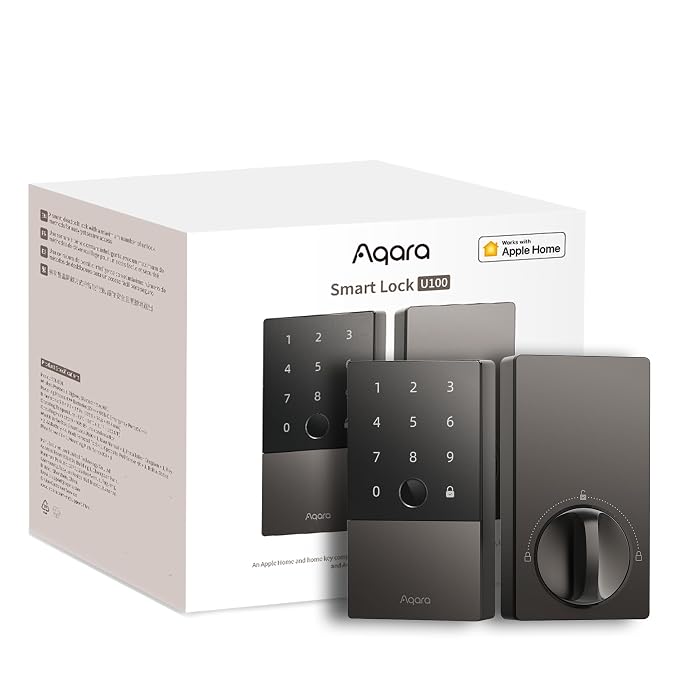
Aqara Smart Lock U100 – Best for Apple HomeKit Users
If you use Apple HomeKit, the Aqara U100 was basically made for you. Full HomeKit support means it shows up right in your Home app. Lock it with Siri. Add it to automations. Set it to lock when you leave home automatically. The integration is seamless in a way that feels genuinely premium.
The fingerprint reader is built right into the keypad. It handles up to 50 fingerprints and responds fast. The touchscreen is smooth and easy to read even in bright sunlight. It also supports NFC cards, so you can tap a card or phone to unlock if that’s your thing.
Battery life is solid too. It uses AA batteries and gives you a good few months before you need to swap them. There’s a low battery alert in the app, so you won’t get caught off guard.
The design is clean and minimalist. Looks great on modern doors. It also includes a physical key slot for emergencies, which is always a good thing to have. If you’re building a HomeKit home setup and want everything talking to each other smoothly, this lock belongs on your shortlist.
- Full Apple HomeKit and Siri support
- Fingerprint, touchscreen, NFC, and key access
- Clean minimalist design
- AA battery powered with low battery alerts
- Physical key backup included
I hope this guide made your decision a little easier. The right lock depends on your situation. Renters should look at August. Apple fans will love Aqara. If budget matters, eufy is the one. Want maximum entry options? ULTRALOQ wins that race. Whatever you pick, just make sure it fits your door, your lifestyle, and your phone. A smart lock you actually use beats a fancy one you fight with.
| Product | Best For | Wi-Fi Built-In | Fingerprint | Approx. Price |
|---|---|---|---|---|
| Schlage Encode BE489WB | Overall security | Yes | No | ~$200 |
| Kwikset Halo Touch | Fingerprint speed | Yes | Yes | ~$200 |
| August Smart Lock | Renters | Needs bridge | No | ~$150 |
| ULTRALOQ 8-in-1 Bolt | Multiple entry options | Yes | Yes | ~$180 |
| eufy Security C220 | Budget buyers | Yes | Yes | ~$90 |
| Aqara U100 | Apple HomeKit users | Yes | Yes | ~$120 |
Things to Consider Before Buying an Electronic Door Lock (Complete Guide)
Buying an electronic door lock sounds simple until you’re standing in front of a dozen options, all promising to be the best. Then the confusion kicks in. Which one actually fits your door? Will it work with your phone? What happens when the battery dies?
These are real questions. And getting the answers wrong means spending money on something that frustrates you every single day. Knowing the right things to consider before buying an electronic door lock saves you that headache before it starts.
Lock Type and Door Compatibility
Not every smart lock fits every door. That’s the first thing most people skip, and it causes real problems. Some locks replace your entire deadbolt. Others, like the August Smart Lock, attach right over your existing hardware on the inside. Completely different installation.
Before you buy anything, measure your door thickness. Most standard doors are between 1.375 and 2 inches thick. Some locks don’t work outside that range. Also check if your door is metal, because some locks have trouble mounting on hollow metal doors without extra hardware.
Look at your current deadbolt too. If it’s a standard ANSI single-cylinder deadbolt, most smart locks will fit right in. But if your door has an unusual cutout or a non-standard backset, you might need an adapter or a completely different lock. Always check the specs before hitting buy.
- Measure door thickness before purchasing
- Check if your current deadbolt is ANSI standard
- Confirm compatibility with metal or non-standard doors
- Look for adapter kits if your door is unusual
Entry Methods and Access Options
Smart locks come with different ways to get inside. Fingerprint, keypad code, physical key, app, NFC card, voice control. Some locks offer just one or two. Others, like the ULTRALOQ, offer eight different methods. The question is which ones actually fit your daily life.
Think about your household. If you have kids, a fingerprint or a simple code is probably better than an app. Kids lose phones. They forget codes less often. If you run an Airbnb, temporary codes that expire automatically are worth their weight in gold. You set them once and stop thinking about it.
Always pick a lock that has at least a physical key backup. Apps crash. Batteries die. Fingerprint sensors have bad days with wet or cold fingers. A key backup is not old-fashioned. It’s just smart. You don’t want to be locked out because your phone died at 11pm.
- Match entry methods to who uses the lock most
- Choose fingerprint or keypad for kids and older family members
- Look for temporary code features if you have guests or renters
- Never buy a lock without a physical key backup
Connectivity and Smart Home Integration
Some locks connect via Wi-Fi. Others use Bluetooth, Zigbee, or Z-Wave. This matters more than most people think. Wi-Fi locks work remotely from anywhere. Bluetooth locks only work when you’re close. Big difference if you want to check your door from another city.
If you have a smart home setup already, check what platform it runs on. Alexa, Google Home, Apple HomeKit, SmartThings. Not every lock plays nice with every system. The Aqara U100 is built around HomeKit. If you’re an Android and Google Home person, that lock will frustrate you.
Hub requirements matter too. Some locks need a separate hub or bridge to unlock remote features. August requires their Connect bridge for Wi-Fi access. That’s an extra cost people miss. Schlage Encode and Kwikset Halo have Wi-Fi built right in, no hub needed. Read the fine print before you assume.
- Wi-Fi locks work remotely, Bluetooth locks need you nearby
- Match the lock to your existing smart home platform
- Check if a hub or bridge is required for full features
- Avoid buying a lock that doesn’t support your ecosystem
Security Rating and Build Quality
A smart lock with bad physical security is just a fancy target. The ANSI grading system tells you how tough a lock actually is. Grade 1 is the highest for residential use. It means the lock passed serious stress testing, including physical attacks and thousands of open-and-close cycles.
Schlage holds a Grade 1 rating. That’s why it costs more. And honestly, for a front door, that extra investment makes sense. Not every lock on the market publishes its ANSI grade. If a brand won’t tell you, that’s worth being suspicious about.
Also look at the materials. Zinc alloy and solid metal housings last much longer than plastic-heavy builds. Check the weatherproofing rating too, especially if your door faces rain, humidity, or direct sun. An IP65 rating means it can handle dust and water. Anything below that on an exposed exterior door is a risk.
- Look for ANSI Grade 1 for maximum residential security
- Avoid locks that don’t publish their security ratings
- Choose solid metal builds over plastic-heavy designs
- Check IP weatherproofing rating for exterior doors
Battery Life and Power Backup
Every electronic lock runs on batteries. No electricity needed, which is actually great during a power outage. But batteries die, and if yours run out at the wrong moment, you’ve got a problem. So battery life is something you really need to think about before buying.
Most locks use AA or AAA batteries and last anywhere from six months to a year depending on usage. The eufy C220 is known for solid battery life. Locks with fingerprint readers or bright displays tend to drain faster. Worth knowing before you commit.
Always pick a lock that sends low battery alerts to your phone. Most good ones do. Some locks also have an emergency power option, a spot where you can press a 9-volt battery against two terminals on the outside to get enough juice to enter a code. Small feature. Huge relief when you actually need it.
- Check average battery life before buying
- Fingerprint and display features drain batteries faster
- Always choose locks with low battery phone alerts
- Look for emergency external power options on the keypad
Price, Warranty, and Long-Term Value
The cheapest lock is rarely the best deal. A $40 no-name lock with no brand support, no warranty, and questionable encryption is actually an expensive mistake. You’re protecting your home. That’s not the place to cut corners.
Most quality smart locks land between $90 and $220. The eufy C220 sits at the budget end and still delivers solid features. Schlage and Kwikset are at the top end but back it up with real security ratings and decent warranties. Most reputable brands offer one to three years of coverage. Check what’s included because some only cover defects, not wear and tear.
Also think about long-term support. Does the company still update the app? Are they going to drop support for the lock in two years? Bigger brands like Schlage and August have been around long enough that you can trust they’ll keep the software working. A smart lock without software support is just a regular lock with a dead app on your phone.
- Budget between $90 and $220 for reliable quality
- Avoid no-name locks with no published security info
- Check warranty length and what it actually covers
- Choose brands with a track record of software updates
I hope this breakdown makes the decision easier for you. Thinking through the things to consider before buying an electronic door lock now means zero regrets later. Pick the lock that fits your door, your life, and your budget. The right one is out there. You just needed to know what to look for.
| Factor | What to Check | Why It Matters | Quick Tip |
|---|---|---|---|
| Door Compatibility | Door thickness, backset size, deadbolt type | Wrong fit means the lock won’t install | Measure twice before ordering |
| Entry Methods | Fingerprint, code, key, app, NFC | Different households need different access options | Always keep a physical key backup |
| Connectivity | Wi-Fi, Bluetooth, Zigbee, hub required | Determines if you can control it remotely | Wi-Fi built-in saves extra costs |
| Smart Home Platform | Alexa, Google, HomeKit, SmartThings support | Lock must match your existing setup | Check compatibility before buying |
| Security Rating | ANSI Grade 1, IP weatherproofing | Physical strength matters as much as smart features | Grade 1 is the gold standard |
| Battery Life | Battery type, months of use, alert system | Dead batteries can lock you out | Pick locks with low battery alerts |
| Price and Warranty | Cost range, warranty length, what’s covered | Cheap locks often cost more in the long run | Aim for $90 to $220 for solid quality |
| Brand Support | App update history, customer service reputation | Software matters as much as hardware | Stick to brands with proven track records |
Frequently Asked Questions (FAQs)
Is it safe to use a Wi-Fi smart lock on my front door?
Yes, it is. Most reputable smart locks use AES 128-bit or 256-bit encryption, which is the same standard banks use. As long as you keep your app updated and use a strong Wi-Fi password, the risk is very low. The bigger threat is usually a weak password on your home network, not the lock itself.
Is it hard to install an electronic door lock yourself?
Most of them are genuinely easy. Products like August attach over your existing hardware in about ten minutes. Others, like Schlage or Kwikset, replace your old deadbolt but come with clear instructions. If you can use a screwdriver, you can handle most of these installs. Just measure your door thickness before buying.
Can someone hack my smart lock remotely?
It’s technically possible but very unlikely with a trusted brand. Schlage, Kwikset, August, and the others on this list use strong encryption. Keep your firmware updated and use two-factor authentication on your account when available. That alone shuts down most risks. Avoid cheap, no-name locks where security corners get cut.
Can I still use a physical key with these smart locks?
Yes, most of them include a physical key slot as a backup. August is the most convenient here because it keeps your existing lock on the outside. The others have a keyway built in. It’s always smart to keep a backup key somewhere, just in case your phone dies or the battery runs low.
Do I need a smart home hub for these locks to work?
Not for most of them. Schlage, Kwikset Halo, ULTRALOQ, eufy, and Aqara all have built-in Wi-Fi. No hub needed. August does require a separate bridge accessory for remote Wi-Fi access. If you’re using Zigbee or Z-Wave locks, then yes, a hub is needed. But the picks in this guide are largely hub-free.
Do smart locks work when the power goes out?
Yes. All of these run on batteries, not your home’s electricity. A power outage won’t lock you out. The app features may go offline if your router loses power, but you can still use your keypad, fingerprint, or physical key. Battery backup is one of the biggest advantages of smart locks over smart doorbells or cameras.
Is it worth spending more on a Grade 1 certified lock?
Absolutely. ANSI Grade 1 is the highest residential security rating. It means the lock passed thousands of cycles of open-and-close testing and resisted physical attacks. Schlage Encode carries this rating. If your front door is your main security line, spending a bit more on a Grade 1 lock is one of the smartest things you can do.
Can I give temporary access to guests without sharing my code?
Yes, and this is one of the best features of smart locks. Most of the locks here let you create temporary codes that expire after a set time, like one day, one week, or even one single use. ULTRALOQ and Schlage are especially good at this. It’s perfect for Airbnb hosts, housekeepers, or anyone who needs short-term access.
Do fingerprint locks work in cold or wet weather?
Most of them handle it reasonably well, but performance can vary. Kwikset Halo Touch and ULTRALOQ are both designed to read fingerprints even with slightly wet fingers. Cold weather can slow some sensors down. Eufy’s IP65 rating means it handles rain and dust well. Just check the weatherproofing rating before buying if your door is exposed to the elements.
Is it possible to lock myself out with a smart lock?
It’s rare, but yes, it can happen if the battery dies completely and you don’t have a backup. That’s why physical key backup matters. All the locks here include that option. Also, most send low battery alerts to your phone well before the battery actually dies. Keep a spare key somewhere and you’ll never have a problem.